Meet&Co
Finding the best computer tables with storage options comes down to choosing a model that balances work surface area with targeted organizational compartments. The right choice prevents desktop clutter and actively protects your physical health during long working hours.
A high-quality computer desk with storage solves common workspace clutter problems by removing paper stacks and peripherals from your direct view. Rather than buying the biggest table possible, focusing on compact layout efficiency makes your setup far more productive.
💡 Key Takeaways
-
Clutter Directs Focus: Separating your active hardware setup from static paperwork helps lower daily mental distractions.
-
Vertical Space is Highly Efficient: Adding hutch designs or tall tower layouts maximizes smaller rooms without expanding the desk footprint.
-
Ergonomics Require Balance: Ensure your storage components do not block your knees or force you into an awkward typing posture.
-
Material Choices Impact Lifespan: Heavy-duty metal frames paired with premium surfaces outlast cheaper alternatives under heavy multi-monitor setups.
Best Computer Tables With Storage Options
In the search for the best computer tables with storage options, finding a balance between expansive surface area and smart organizational compartments is essential. The right desk layout prevents desktop clutter, streamlines your daily workflow, and actively supports a healthy posture during long hours of focused work. We reviewed the top-rated configurations for 2026—ranging from premium executive setups to space-saving apartment solutions—to help you find the perfect match for your specific workspace needs.1. Best Overall Computer Table With Storage: Meet&Co Reco Series D L-Shaped Executive Desk
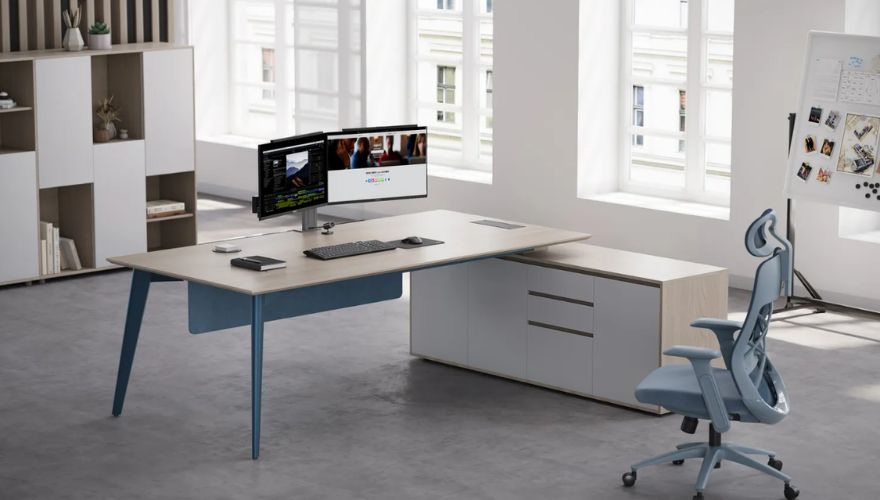
When outfitting a premium corporate office or an upscale home workspace, finding a balance between surface space and high-end organization is essential. Sourcing your office setup from experienced industry leaders like Meet&Co guarantees commercial-grade durability and a sleek, functional layout. The Reco Series D L-Shaped Executive Desk features clean, architectural lines paired with a large return side table that expands your available workspace.
-
Product Overview: This premium executive workstation combines high-density laminate surfaces with integrated lower storage configurations to keep your equipment completely organized.
-
Pros: Exceptional desktop surface area, robust modern design accents, and built-in legal-size document tracking compartments.
-
Cons: Requires a larger room footprint, making it less suitable for compact apartment corners.
-
Best For: Corporate executives, managers, and remote professionals who require an expansive layout for multi-tasking.
2. Best Budget Option: IKEA Micke Desk
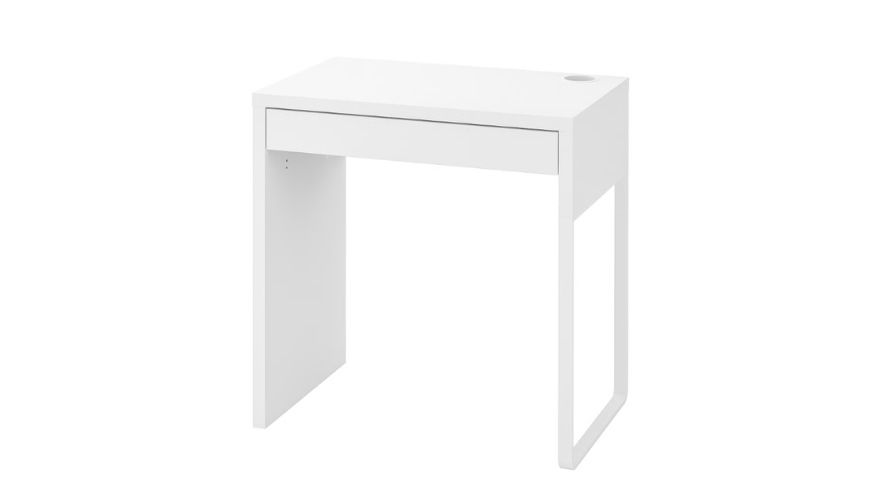
image source: https://www.ikea.com/us/en/p/micke-desk-white-30213076/
For students and remote workers seeking an affordable, minimalist design that doesn’t sacrifice daily functionality, this compact piece remains a global favorite. This clean study desk with storage features a sleek, low-profile silhouette that blends effortlessly into modern bedroom aesthetics.
-
Product Overview: A lightweight, Scandinavian-style writing desk featuring a side storage module and a sleek surface layout.
-
Pros: Highly affordable pricing, clean modern design language, and interchangeable side cabinet placement.
-
Cons: Fiberboard materials are less resilient against heavy physical impacts or liquid spills over time.
-
Best For: High school students, college dorm rooms, and occasional laptop users working with tight budgets.
3. Best for Home Offices: Cabot 60W L Shaped Computer Desk with Hutch and Storage
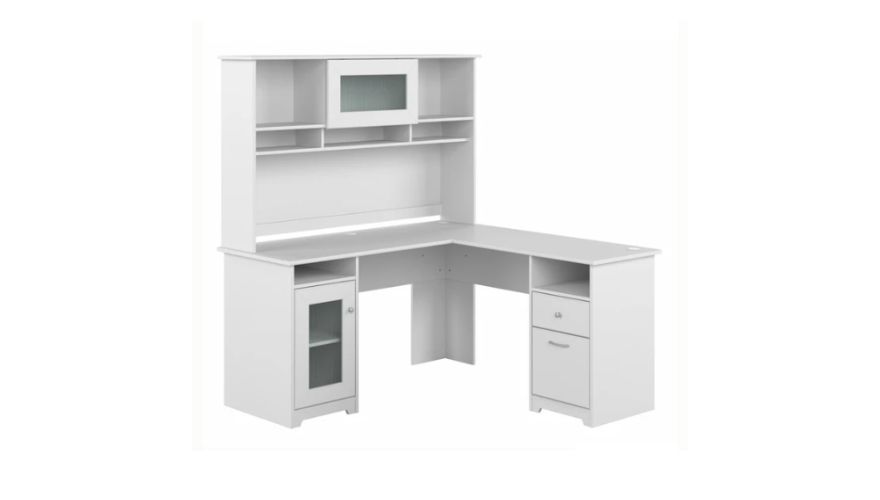
image source: https://www.bushhome.com/products/l-desk-with-hutch-cab001xx
If you are transitioning to full-time remote work, maximizing your vertical room space is the best way to keep your home tidy. The Bush Furniture Cabot 60W offers a complete, wrap-around design that feels like a traditional corporate suite. This comprehensive home office desk with storage configuration keeps your reference binders, active electronics, and daily writing tools close at hand.
-
Product Overview: A classic home office corner workstation featuring an open-shelf hutch module and secure lower locking compartments.
-
Pros: Large vertical organization hutch, elegant traditional wood-grain finishes, and high-quality safety mechanisms on deep drawers.
-
Cons: Assembly requires a significant time investment and clear, step-by-step attention to detail.
-
Best For: Full-time remote workers, accountants, and writers who manage extensive physical files alongside their computer setups.
4. Best for Small Spaces: Tribesigns Compact Computer Table
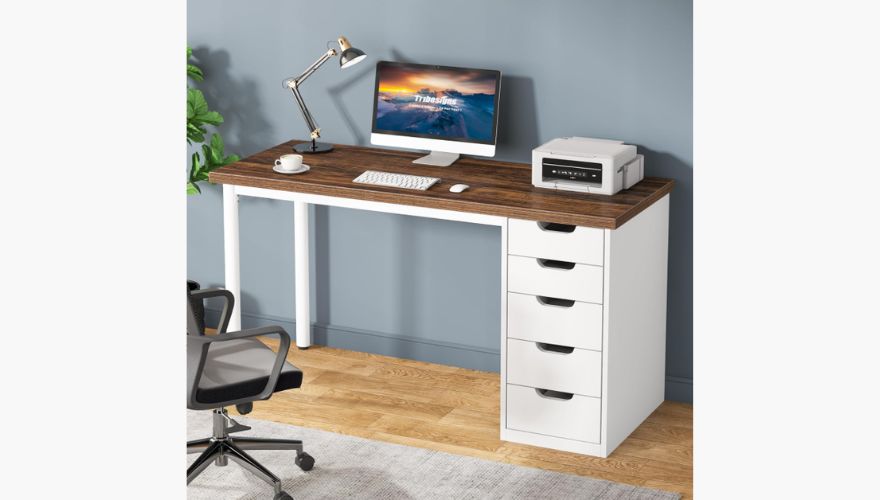
image source: https://www.amazon.com/Tribesigns-Computer-Drawers-Storage-Reversible/dp/B0CTS2P28X?th=1
Working within tight room layouts requires a furniture design that expands upward rather than outward. This specialized storage computer desk relies on an integrated metal tower frame to elevate your computing gear, keeping your floor area completely clear.
-
Product Overview: A space-saving metal and wood hybrid workstation that stacks storage shelving directly above and below the main computer monitor level.
-
Pros: Very narrow floor footprint, incredibly sturdy reinforced iron framing, and excellent utility for small rooms.
-
Cons: Limited depth on the main desktop surface makes it tight for full-sized desktop computer towers.
-
Best For: Studio apartments, cozy bedroom study corners, and minimalist technical setups.
5. Best L-Shaped Desk With Storage: SHW Home Office Corner Suite
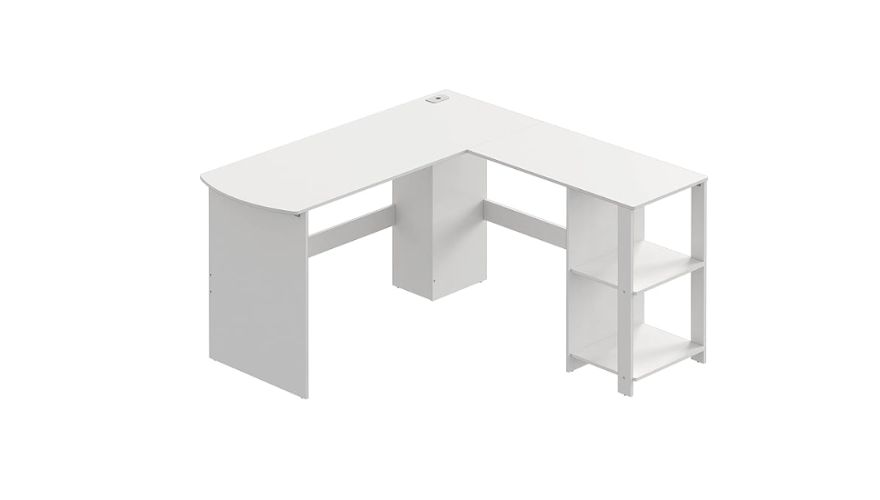
image source: https://www.amazon.co.jp/-/en/SHW-L-Shaped-Office-Wooden-Corner/dp/B0B6F8H91Q?th=1
Corner configurations are fantastic for multitasking, letting you quickly transition between computing tasks and physical paperwork with a simple swivel of your chair. This versatile model relies on deep built-in storage baskets and side shelving to eliminate the need for bulky standalone filing cabinets.
-
Product Overview: An affordable, lightweight L-shaped wood composite desk engineered to fit flush against standard 90-degree room walls.
-
Pros: Maximizes corner space efficiency, includes open side shelving, and features lightweight materials that are easy to move.
-
Cons: The thin laminate surface can show minor scuffs if exposed to heavy daily hardware adjustments.
-
Best For: Creative freelancers and remote workers who need distinct zones for computing and physical sketching.
6. Best Standing Desk With Storage: Meet&Co Sendi-E Height Adjustable Standing Desk
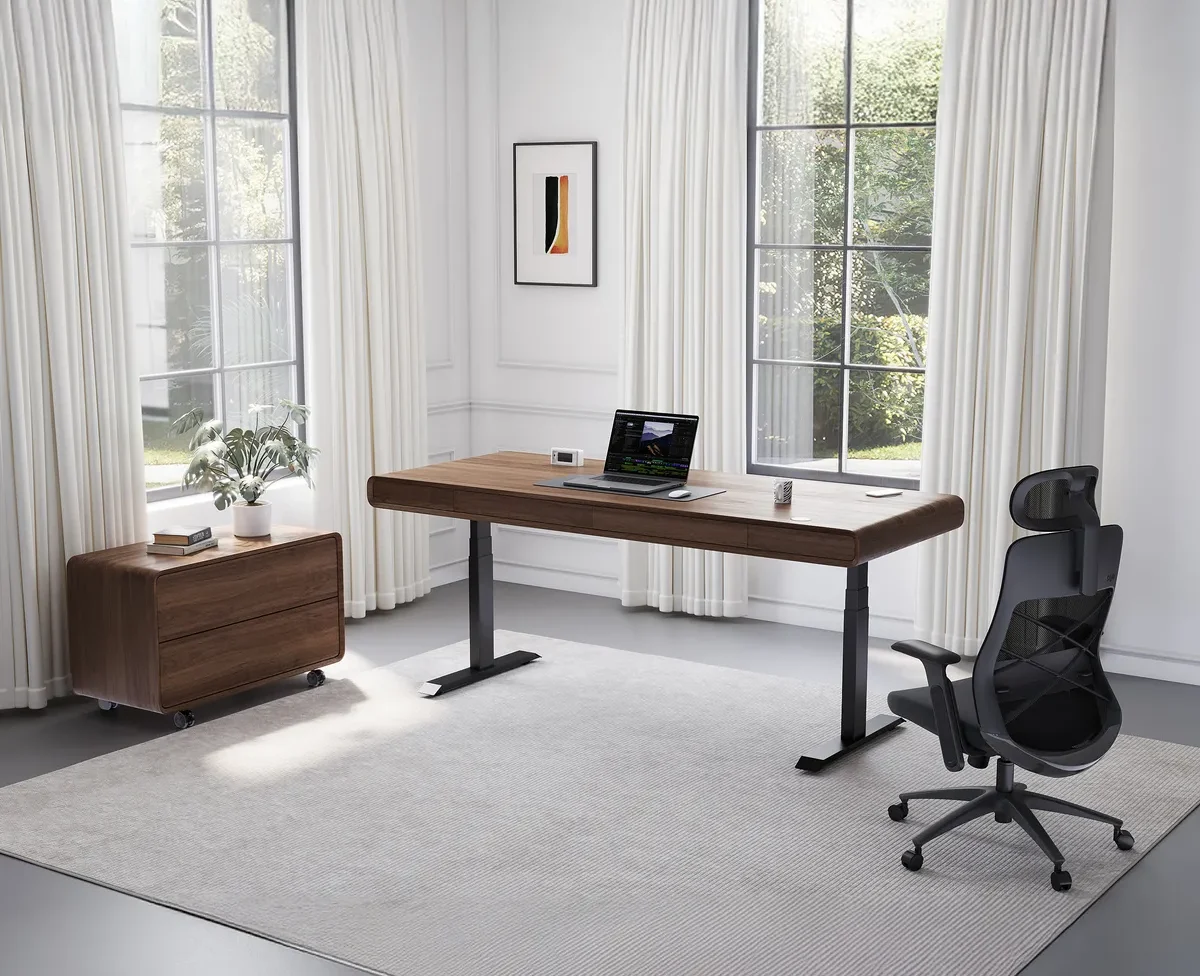
Alternating between sitting and standing throughout your day is a fantastic way to boost circulation and relieve lower back pressure. The Sendi-E Height Adjustable Standing Desk brings smooth motorized control to your workspace, creating a highly adaptable, modern ergonomic workspace.
-
Product Overview: A premium, dual-motor sit-to-stand desk equipped with an advanced digital memory controller and sleek under-desk organization trays.
-
Pros: Incredibly quiet height transitions, heavy-duty weight capacity, and programmable memory presets for seamless daily adjustments.
-
Cons: Features a modern minimalist profile, meaning it lacks deep traditional side drawers.
-
Best For: Health-conscious software developers, remote professionals, and content creators who stand during long focus hours.
7. Best Desk With Hutch Storage: Sauder Orchard Hills Computer Desk
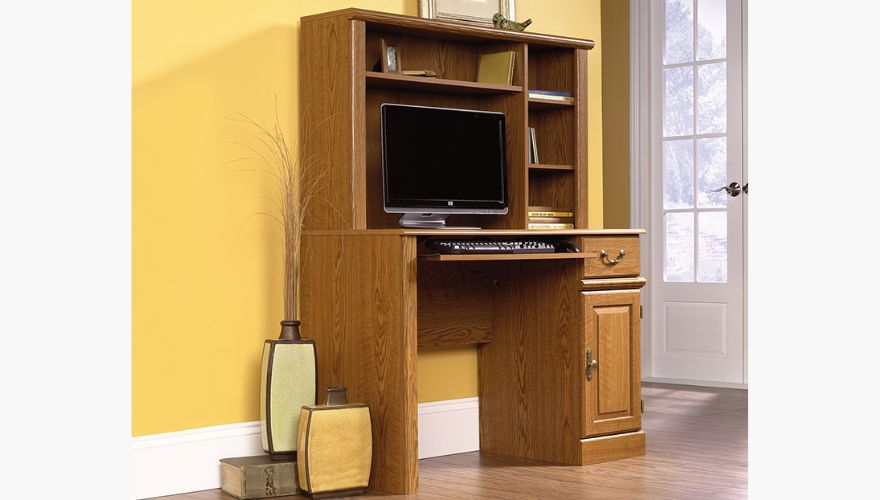
image source: https://www.sauder.com/furniture/401353/computer-desk-with-hutch?srsltid=AfmBOoo0a0C_jTKrzYm-aU6TGDASBobkPFcxKsQem9uHbxoj3ig0ZlVp
For traditional homes that appreciate classic design details, an integrated top organizer brings immediate warmth and structure to your room. This model features a built-in elevated monitor stand shelf that raises your screen to eye level, opening up plenty of functional storage space directly underneath.
-
Product Overview: A classic, rich wood-grained workstation complete with an overhead hutch, small privacy cubbies, and secure side utility compartments.
-
Pros: Elegant traditional look, specialized elevated screen placement, and plenty of hidden compartments for loose paperwork.
-
Cons: The deep traditional wood aesthetic can look a bit heavy in bright, ultra-modern rooms.
-
Best For: Home libraries, traditional study rooms, and users who prefer a classic, furniture-heavy aesthetic.
8. Best Heavy-Duty Workstation Desk: Meet&Co Reco Series Office Workstation
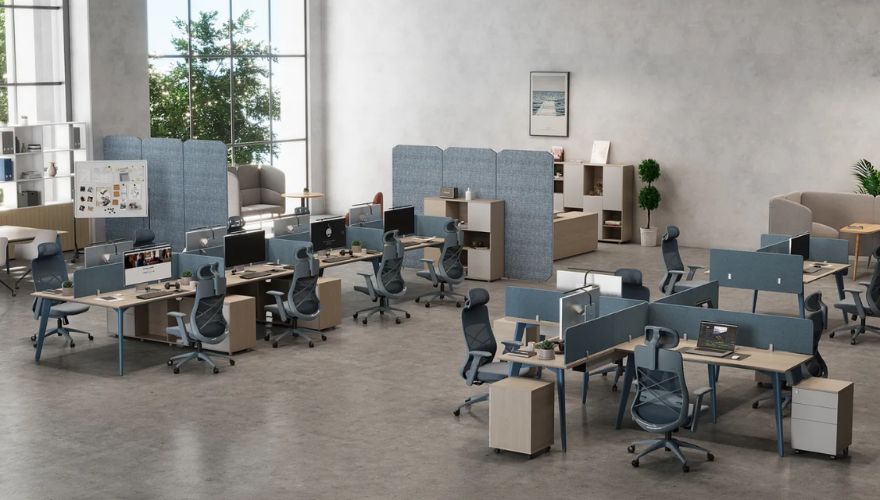
In busy corporate environments or multi-user home offices, furniture needs exceptional structural durability to handle constant daily use. The Reco Series Office Workstation provides a rock-solid, professional-grade platform engineered to serve as a reliable, high-performance workstation desk.
-
Product Overview: A commercial-grade, multi-user benching table system built with reinforced steel legs and thick, scuff-resistant modular privacy panels.
-
Pros: Excellent structural durability, clean integrated power configurations, and modular privacy panel options for focused work.
-
Cons: Features an industrial, corporate design profile that may feel too formal for casual home decor styles.
-
Best For: Modern open-plan corporate offices, multi-child study areas, and professional testing environments.
Storage Types Explained: Which One Do You Really Need?
Choosing the right desk layout depends heavily on the specific items you need to store and organize throughout your typical workday.
1. Drawers
A premium computer table with drawers is the best choice for storing small office supplies, sensitive papers, and everyday tools. Keeping these smaller items hidden out of sight prevents your main workspace from becoming cluttered with pens, cables, and loose notes.
2. Shelves
Opting for a desk with storage shelves offers fast, easy access to larger items like reference textbooks, printers, and external hard drives. Open shelving keeps your most-used tools within arm’s reach, allowing for smooth transitions between different tasks.
3. Cabinets
An office desk with cabinets is ideal for stowing bulky equipment, extra paper reams, and personal items. Large doors conceal visual clutter completely, maintaining a clean and professional aesthetic across your entire room layout.
4. Hutch Storage
Utilizing a overhead hutch provides excellent, space-saving vertical storage by taking advantage of the empty wall space above your monitor setup. This layout lets you add plenty of organization options without expanding your desk’s floor footprint.
How Much Storage Does a Computer Desk Need?
Your optimal storage capacity depends directly on your daily workflow and your hardware requirements. Students and casual web browsers usually need just a single drawer for basic notebooks and writing tools. Conversely, graphic designers and software engineers managing complex equipment require expansive storage layouts to organize multiple devices, sketching tablets, and reference materials.
For small apartment users, choosing a desk with integrated lower shelves eliminates the need for separate bookcases, maximizing your available floor plan. Make sure to audit your active gear before purchasing to find a configuration that fits your workflow perfectly.
Buying Guide: How to Choose the Right Computer Table With Storage
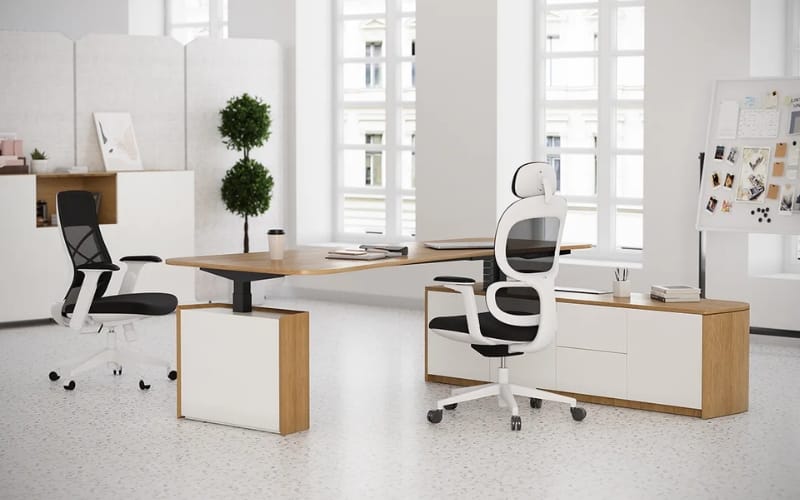
Standing Desks With Storage
1. Desk Size
Measure your available room space carefully, making sure to leave at least 36 inches of clear space behind the desk so your office chair can glide back smoothly.
2. Storage Capacity
Review your daily gear to decide whether you need deep, heavy drawers for legal documents or wide, open shelving for hardware peripherals and large books.
3. Material Quality
A solid steel frame paired with a premium top ensures long-term stability. If you handle heavy paper archives, look for a reinforced file drawer compartment equipped with smooth, commercial-grade ball-bearing glides to ensure smooth daily operation.
4. Cable Management Features
High-end computing setups require smart cord organization. Prioritizing built-in cable management channels, under-desk tray routing, and desktop grommets keeps dangerous cords out of sight and prevents tangling.
5. Ergonomics and Monitor Placement
To maintain a healthy, pain-free posture during long hours of focus, look for a model that features an integrated slide-out keyboard tray. This drops your typing angle to a natural position, relaxing your shoulders and preventing strain.
6. Future Upgrade Potential
Choose a modular design that allows you to add or remove side shelving down the road, ensuring your workspace can adapt as your workflow or hardware needs expand.
What are the Common Mistakes to Avoid?
-
Choosing Bulky Closed Cabinets Over Open Shelving: Relying entirely on closed storage doors in small rooms can make your workspace feel cramped. Incorporating open shelving balances the room’s design and keeps your most-used gear visible and easy to reach.
-
Ignoring Your Cord Routing Paths: Buying a desk without built-in cord cutouts forces cords over the front edge, which creates clutter and risks damaging your hardware connections.
-
Picking Shallow Desktop Depths: Choosing a desktop surface under 24 inches deep leaves very little room for a keyboard and mouse once a large monitor is placed on top.
-
Forgetting Your Screen Layout Space: Large overhead storage hutches can block tall screens, so always measure your monitor height before committing to a top shelf design.
Conclusion
Upgrading to the right computer table transforms your daily workflow by eliminating visual distractions and protecting your physical health over long hours of focus. By matching your specific storage needs with durable materials and smart cable routing, you can build an incredibly productive, inspiring workspace. Investing in high-quality furniture pieces from established commercial design experts like Meet&Co Office Furniture ensures your beautiful new home or corporate setup stays clean, comfortable, and perfectly supportive for years to come.