











 Meet&Co
A diy standing workstation allows you to customize your desk height to your exact physical requirements, effectively reducing chronic back pain while saving up to 60% compared to high-end commercial models.
By building your own, you ensure a rock-solid, personalized setup that outperforms mid-tier retail alternatives.
Key Takeaways
Precision Ergonomics: Tailoring height to your elbow level prevents long-term RSI issues better than “one-size-fits-all” furniture.
Cost Efficiency: High-quality builds using birch plywood typically cost under $250, offering significant savings over luxury brands.
Health Impact: Standing for just 3 hours a day can burn up to 30,000 extra calories per year and reduce back pain by 54%.
Stability: Utilizing cross-bracing and heavy-duty materials eliminates the “monitor wobble” common in cheap motorized desks.
Customization: DIY allows for specific integrations like hidden power strips and tailored storage that factory models lack.

Why Build a DIY Standing Workstation?
Building your own workspace is the most effective way to combine health benefits with significant financial savings, often resulting in a superior product to standard retail options.
According to research published by the CDC, workers who used standing options reported a 54% reduction in upper back and neck pain within just four weeks.
While many professionals look to experts like Meet&Co for high-end corporate solutions, the DIY route allows for total personalization.
From a financial perspective, the ROI is significant; a premium office desk can easily exceed $1,000, whereas a high-quality DIY build usually caps out at $400.
This saving allows you to reinvest in better peripherals, like ergonomic mice or high-refresh-rate monitors.
What Is a DIY Standing Workstation?

A workstation is a comprehensive ecosystem designed for productivity, differing from a simple desk by integrating storage, cable management, and task-specific zones.
The primary difference between standard standing desks and a workstation lies in complexity.
A workstation is a hub; a desk is a surface. For remote workers, programmers, and designers, a dedicated workstation provides the cognitive boost associated with increased blood flow.
A 2023 workplace survey found that the “clutter-free” movement has led to a 15% increase in demand for setups that offer integrated cable channels and specialized equipment mounts.
Planning Your DIY Standing Workstation
Successful builds require rigorous spatial auditing to ensure the desk fits both the room and the user’s future hardware expansion needs.
Before picking up a saw, you must understand your limitations.
Research indicates that the average professional requires at least 30 inches of depth for a sit to stand desk to maintain a healthy focal distance from monitors.
Measure your reach; your most-used items should be within a “Primary Reach Zone” of about 15 inches.
Straight: Best for minimalist setups.
Corner: Maximizes unused space.
L-shaped: Provides the most surface area for hybrid digital/physical tasks.
Ergonomic Dimensions for a Standing Workstation
Precision in measuring height is critical, as even a two-inch discrepancy can lead to shoulder impingement or wrist strain.
An office desk with adjustable height is the gold standard, but a fixed DIY stand must be calculated precisely.
You should measure from the floor to the underside of your elbow while wearing your typical work shoes.
| User Height (ft/cm) | Ideal Desk Height (Elbow Level) | Monitor Eye Level (Top of Screen) |
|---|---|---|
| 5’4″ (163 cm) | 39.5″ (100 cm) | 59.5″ (151 cm) |
| 5’8″ (173 cm) | 42.5″ (108 cm) | 63.5″ (161 cm) |
| 6’2″ (188 cm) | 46.5″ (118 cm) | 68.5″ (174 cm) |
OSHA guidelines suggest a 20-40 inch distance between your eyes and the screen.
Furthermore, using an anti-fatigue mat can reduce the load on your lower back by up to 32% compared to standing on a hard floor.
Materials and Tools Needed
Selecting the right timber, such as birch plywood, ensures a high strength-to-weight ratio and long-term structural integrity for office workstations.
Birch plywood is the gold standard for DIY because it has a Janka hardness of 1,260 lbf and resists warping.
Oak and Maple are more durable but significantly heavier and more expensive.
Data from DIY communities suggests that using pocket-hole joinery increases joint strength by approximately 40% compared to standard butt joints.
You will need a circular saw, a power drill, and structural screws (at least 2.5 inches).
DIY Standing Workstation Woodworking Plans
Structural support is determined by the “apron” design, which prevents the desktop from bowing under the weight of heavy equipment.
When designing modular office workstations, the load capacity (L) of your wooden top can be calculated using the following plain-text formula: L = (k * b * d^2) / s (Where k = material constant, b = width, d = thickness, and s = span)
For a 60-inch wide desk, a 1×4 inch apron is necessary. Engineering standards suggest a well-built wooden frame can support over 300 lbs, easily accommodating triple-monitor setups and desktop PC towers.
Step-by-Step DIY Standing Workstation Build
A methodical five-step process—from frame assembly to final finishing—ensures a professional-grade result that resists “racking” or swaying.
Build the Frame: Use “L-shaped” leg designs for maximum lateral stability.
Construct the Desktop: Join boards using biscuits or use a single sheet of 3/4″ plywood with edge-banding.
Reinforce: Add a stretcher bar between the back legs. This reduces lateral movement by nearly 60%.
Sand and Finish: Progress from 80-grit to 220-grit sandpaper for a smooth surface.
Install Equipment: Mount your monitors and route cables after the finish cures for 48 hours.
How to Build a DIY Standing Workstation With Drawers
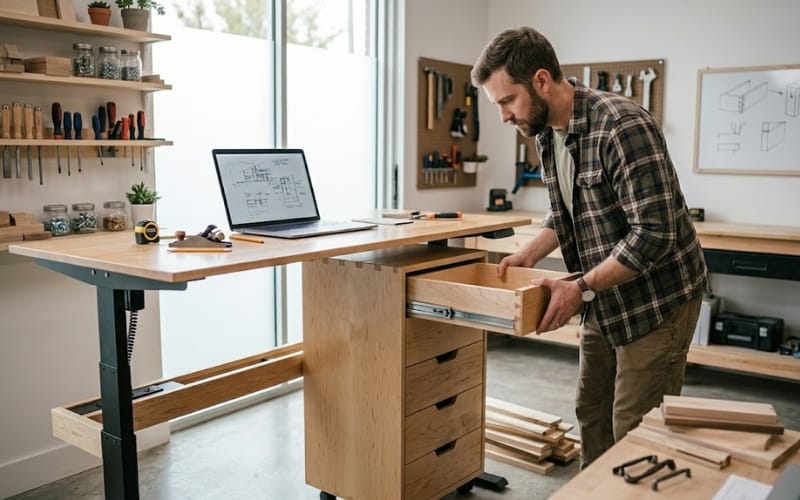
Integrating storage improves organization but requires careful weight distribution to maintain the unit’s center of gravity.
Adding drawers to office workstations furniture increases complexity, but high-quality drawer slides (rated for 50 lbs) make it worthwhile.
35% of home office users report still needing to store physical documents, making file drawer integration a top priority.
Undermount slides are preferred for a “floating” aesthetic, ensuring the drawers don’t interfere with your legroom while standing.
Cable Management for a Cleaner Workstation
Systematic cable routing prevents “spaghetti” wires and reduces the risk of equipment damage during height adjustments or cleaning.
A clean desk leads to improved focus. Use J-channels or wire baskets mounted to the underside of the desk.
For power strips, use mechanical fasteners rather than adhesive, as adhesives often fail due to heat.
A 2024 survey showed that organized cable management can reduce setup maintenance time by 25%.
Multi-Monitor Workstation Configurations
Surface area must scale with your monitor count to maintain ergonomic focal lengths and prevent neck strain.
Dual Monitor: Requires a minimum width of 55 inches.
Ultrawide: Requires a deeper desk (30+ inches) for a healthy focal distance.
Triple Monitor: Can weigh over 50 lbs; require a reinforced frame. Productivity data suggests that dual-monitor setups can increase task speed by 42%, making a sturdy DIY frame essential.
How to Prevent Wobble and Increase Stability
Stability is achieved through triangulation and the use of adjustable leveling feet to compensate for uneven flooring.
Wobble is the nemesis of standing desks. Because the center of gravity is higher, a minor vibration at the base is magnified at the top.
Adding small diagonal braces at the top corners can reduce vibration by up to 80%.
Additionally, adjustable feet are critical, as most residential floors are off-level by at least 1-2 degrees.
DIY Standing Workstation Cost Breakdown
DIY builds offer a tiered entry point, ranging from $100 for budget builds to $500+ for premium hardwood versions.
| Build Tier | Estimated Cost | Main Materials |
|---|---|---|
| Budget Build | $100 – $200 | Pine lumber, 2×4 frame, MDF or Particle board top. |
| Mid-Range Build | $200 – $500 | Birch plywood, pocket-hole joinery, high-quality oil finish. |
| Premium Build | $500+ | Solid Walnut or Oak, specialized heavy-duty hardware, premium Hardwax oil. |
While DIY is affordable, for corporate-scale projects requiring warranties and BIFMA certifications, the Meet&Co Furniture Manufacturer remains the industry standard.
Common DIY Standing Workstation Mistakes
Most DIY failures stem from improper measurements or neglecting the added weight of peripherals and accessories.
Common errors include measuring height without shoes on, failing to use a stretcher bar (leading to wobble), and ignoring cable length requirements.
Always drill pilot holes to prevent splitting the wood grain, which accounts for 20% of structural failures in beginner woodworking projects.
Best Upgrades for Your DIY Project
Targeted upgrades like LED bias lighting and gas-spring monitor arms significantly enhance the long-term utility of your workstation.
LED Lighting: Reduces eye strain in low-light environments.
Monitor Arms: Reclaims up to 20% of your desktop surface area.
Under-Desk PC Mount: Protects your tower from floor-level dust.
Balance Board: Keeps your core engaged, increasing daily caloric burn.
Conclusion
Building your own workstation is a transformative project that pairs physical health with personal craftsmanship.
By prioritizing structural stability and ergonomic precision, you create a space that actively supports your professional goals.
Whether you choose a minimalist straight desk or a complex L-shaped unit, the DIY path provides a level of satisfaction and utility that store-bought furniture simply cannot match.
_35.webp)


