Meet&Co
You have decided to invest in an ergonomic chair. Good call.
But then you start looking online. Suddenly, every chair claims to be ergonomic. Features keep piling up — 4D armrests, synchronous tilt, 6‑way lumbar, headrests that move in mysterious directions. The prices range from 150to150to1,500. And every brand tells you their model is the one you need.
If that sounds familiar, you are in the right place.
The Meet&Co team wrote this guide for beginners. It cuts through the feature clutter and helps you focus on what genuinely matters – and what you can safely ignore.
Let‘s walk through the essential features, the nice‑to‑haves, the common over‑hyped features, and three solid chairs worth considering.
What Makes a Chair Actually Ergonomic?
Before we get into features, a quick reality check.
The word “ergonomic” is not regulated. Any manufacturer can slap it on a product description. A $50 plastic folding chair can be called ergonomic if the seller decides to use the word.
So how do you separate real ergonomics from marketing?
The answer is simple. Adjustability. A truly ergonomic chair adapts to your body, not the other way around. It lets you change the seat height, the back angle, the lumbar position, and (in better models) the armrests and seat depth. A fixed chair that someone labeled “ergonomic” is just a chair.
The good news is that you do not need all the fancy adjustments right away. A few core features will cover 80% of your needs as a beginner.
Essential vs. Nice-to-Have: A Quick Overview
Here is a simple cheat sheet to keep with you while you shop.
| Feature | Essential? | Why |
|---|---|---|
| Adjustable seat height | ✅ Yes | The absolute non‑negotiable foundation of comfort. Your feet must rest flat on the floor. |
| Adjustable (or decent fixed) lumbar support | ✅ Yes | This directly protects your lower back, which takes the most strain during sitting. |
| Breathable back material | ✅ Yes | Mesh and perforated fabric keep you cool and sweat‑free during long sits. |
| Seat depth adjustment | ❗ Nice-to-Have | Important if you are very tall or very short. For average users, a properly sized fixed seat can work. |
| Armrests | ⚠️ Depends | If you type all day, yes. For short desk sessions, you can manage without. |
| Headrest | ➖ Situational | Helpful if you lean back frequently or are tall. Not essential for most beginners. |
| 4D/5D armrest movement | ❌ Overkill | Nice for fine‑tuning, but a basic height‑adjustable pair is plenty for most. |
| Synchronous tilt mechanism | ❌ Overkill | A nice luxury for deep recline, but your budget is better spent on the essentials first. |
| Memory foam padding | ➖ Situational | Adds comfort but can also trap heat. Breathable mesh is often better for all‑day use. |
| Foot ring | ❗ Situational | Only needed if you use a drafting chair with a standing‑height desk. |
The Must-Haves: What You Should Not Compromise On
Let‘s dig into the three essential features that every good ergonomic chair should offer.
1. Adjustable Seat Height
This is where proper posture starts — literally from the ground up.
Your feet should rest flat on the floor, with your knees roughly level with your hips or slightly lower. A chair that is too low leaves your knees too high. A chair that is too high leaves your feet dangling. Both cause strain over time, just in different ways.
The standard seat height range in most ergonomic chairs is roughly 16 to 21 inches off the floor. This range accommodates most adults. If you are significantly shorter or taller than average, check the height range carefully — many entry‑level chairs assume a medium frame.
A pneumatic lift lever (the single lever under the seat) is the industry standard. If a chair lacks height adjustment entirely, walk away. It is not ergonomic.
2. Adjustable Lumbar Support (or a Well‑Designed Fixed One)
Lumbar support is the single most important back‑related feature. Your lower spine has a natural inward curve. When you sit without support, that curve flattens, and your back muscles work overtime to hold you upright — leading to fatigue and stiffness over time.
For beginners, adjustable lumbar support is ideal because it lets you position the curve exactly where your spine needs it. Look for height adjustment (moving the support up or down). Depth adjustment (how far it pushes into your back) is a nice bonus but not strictly necessary for your first chair.
If you are on a tight budget, a chair with a well‑designed fixed lumbar curve can still work — as long as it hits the right spot for your body. But a fixed curve that does not align with your spine is worse than no support at all, so testing in person helps.
3. Breathable Back Material
This one is often overlooked by first‑time buyers — and regretted later.
Mesh or perforated fabric backs allow air to circulate while you sit. In warm weather or during long work sessions, this makes a real difference in comfort. A breathable chair keeps you cool and sweat‑free. A chair covered in thick leather or dense fabric can become uncomfortably warm within an hour.
Our designer’s tip: Beginners often gravitate toward leather or synthetic leather chairs because they look “executive” and feel plush in a showroom. In a warm office or during summer months, the lack of breathability becomes a real problem. Your back and thighs will sweat, the material may crack over time, and you will end up buying a mesh chair anyway. For most first‑time buyers, mesh is the safer, more practical choice — especially if you plan to sit for extended periods.
For most beginners, a chair with a mesh seat and mesh back is the safest, most comfortable option. It breathes, it supports, and it does not trap heat.
The Nice-to-Haves: Worth Considering If Your Budget Allows
Once you have secured the essentials, here are features that add genuine comfort.
1. Seat Depth Adjustment
This lets you slide the seat pan forward or backward. A properly adjusted seat leaves about two to three fingers of space between the back of your knee and the front edge of the seat.
For taller users (over about 5‘10“), this feature is often necessary. For average‑height users, a fixed seat of the correct size works fine.
2. Adjustable Armrests
If you spend long hours typing, height‑adjustable armrests help keep your shoulders relaxed and your wrists straight. Your elbows should rest gently on the armrests without hunching to reach them.
For beginners, height adjustment is the most important armrest feature. The fancier movements (in/out, forward/back, pivot) are genuinely helpful but far from essential on your first chair.
3. Headrest
A headrest supports your neck when you lean back. This is most useful for taller users (whose head and neck extend past the backrest), for people who recline frequently, or for anyone with existing neck tension.
If you tend to sit upright and focused without leaning back much, a headrest is optional.
Also see: Best Office Chair with Headrest for 2026: Our 5 Top Picks
4. Breathable Mesh Seat
Some chairs use mesh on both the back and the seat. This is even more breathable than a foam seat. However, mesh seats are firmer than foam. Some people love the firm, supportive feel. Others miss the cushioning of foam.
If you prefer a softer sitting surface, look for a mesh back with a high‑density foam seat — a popular and effective middle ground found in many entry‑level ergonomic chairs, including the Budding model recommended below.
5. Tilt Mechanism (Recline)
A chair that tilts back allows you to change position throughout the day and rest your spine during breaks. Even basic tilt locks (locking the chair in one recline position) are helpful. Fancy synchronous tilt mechanisms (where the seat and back move together) are nice but not essential for beginners.
What You Can Safely Ignore (The Marketing Over‑Hyped)
Here is where you can save money as a beginner. These features are genuinely useful for specific users with specific needs. For most first‑time buyers, they are overkill.
-
4D/5D armrests. Height‑adjustable armrests are great. The ability to pivot, slide forward, and move in/out is fine‑tuning that most people never use on a daily basis.
-
Synchronous tilt mechanisms. Yes, premium chairs have them. No, you do not need one to sit comfortably.
-
Memory foam padding. Memory foam is soft and conforming. It also traps heat and can compress over time. High‑density foam is often more breathable and longer‑lasting.
-
Weight‑activated recline. Some chairs adjust recline resistance based on your body weight. This is a luxury, not a necessity.
-
Lumbar support with depth + height + angle + independent side adjustment. You can get lost in the fine‑tuning options here. For a beginner, a simple height‑adjustable lumbar pad is plenty.
Our editor‘s experience: In a year of testing chairs across different price points, I have seen very few users — even in high‑end ergonomic chairs — regularly adjust their armrests beyond basic height and occasionally width. The 4D armrests look impressive on a spec sheet, but in daily use, most people set them once and forget them. Put your budget toward the essentials (seat height, lumbar support, breathable materials) first. Upgrade to extra adjustability later if you discover you need it.
3 Ergonomic Chairs Worth Considering for Beginners
Here are three chairs that cover different price points and needs — from an entry‑level value pick to a well‑rounded mid‑range favourite.
1. Meet&Co Budding Ergonomic Office Chair — Best All‑Round Beginner Chair
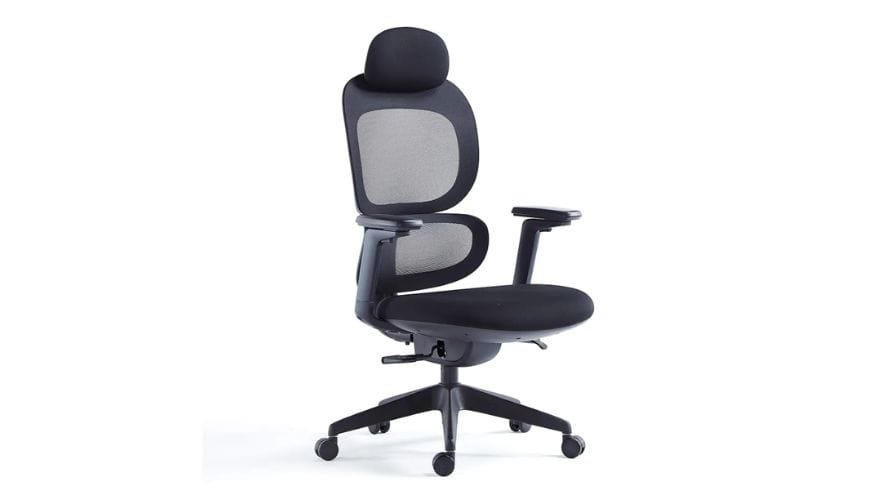
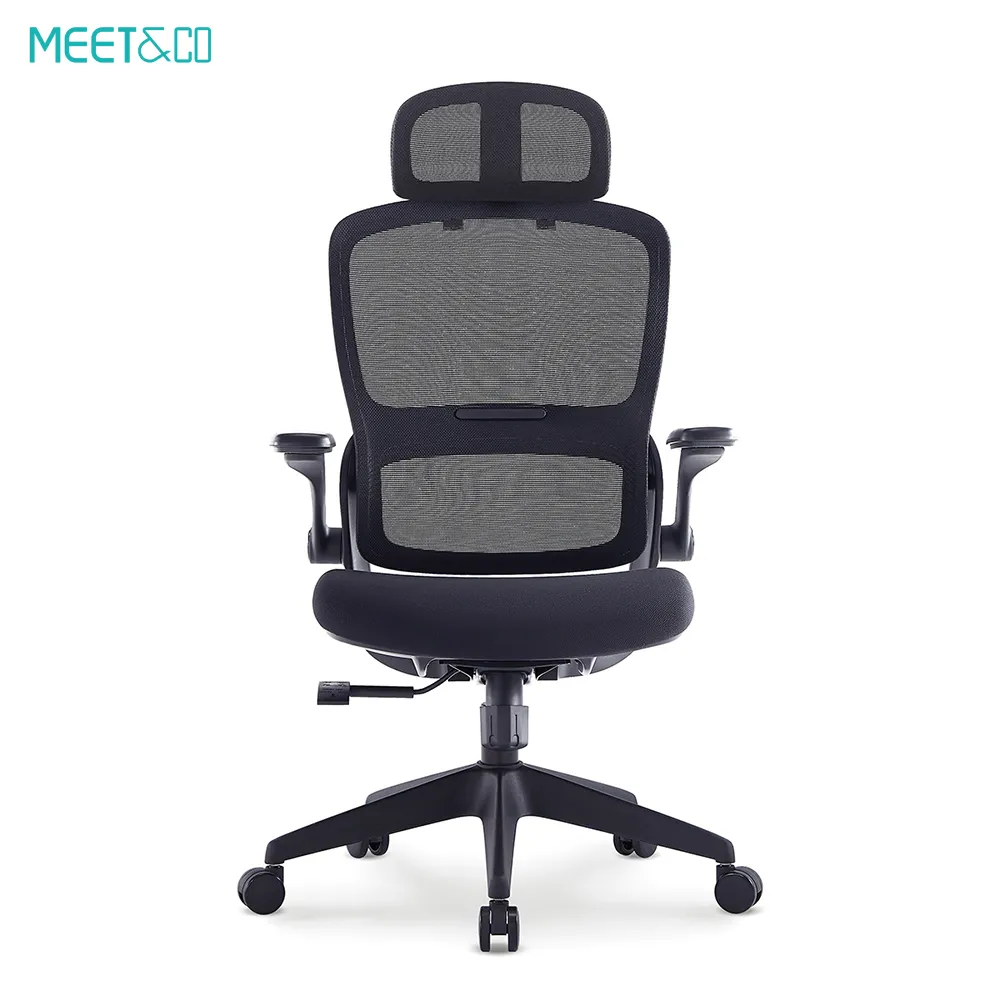
The Budding chair is designed specifically for people who want genuine ergonomic support without overcomplicating things.
The breathable mesh back keeps air moving, preventing that sticky, uncomfortable feeling that builds up during long workdays. The adjustable lumbar support adapts to your spine‘s natural curve — you can move it up or down to find the spot that works for your lower back. The thickly cushioned seat with a deep contour helps keep your spine properly aligned.
What makes the Budding especially beginner‑friendly is its balance of features. You get full adjustability — lumbar support, headrest, seat height, armrests, and tilt tension — without paying for over‑engineered extras you might never use. The three‑position tilt lock lets you lean back and rest when you need a break.
The chair comes in a range of colours, so you can match it to your workspace without compromising on comfort. And with factory‑direct pricing and a 1–3 year warranty, it offers strong value for first‑time buyers.
What sets the Budding chair apart: Deeply contoured foam seat + flexible mesh back that mimics more expensive dynamic support systems. The mesh gently yields as you shift, maintaining consistent spinal contact without feeling stiff.
Best for: Home office users, first‑time buyers, and anyone who wants a comfortable, adjustable chair without spending a small fortune and without being overwhelmed by unnecessary features.
Key strengths: Breathable mesh back, adjustable lumbar support, padded deep‑contour seat, three‑position tilt lock, full adjustable armrests and headrest, comes in multiple colours.
2. Sihoo M57 Ergonomic Office Chair — Best Budget Value Pick
https://www.sihoo.com/en/products/m57-ergonomic-office-chair/
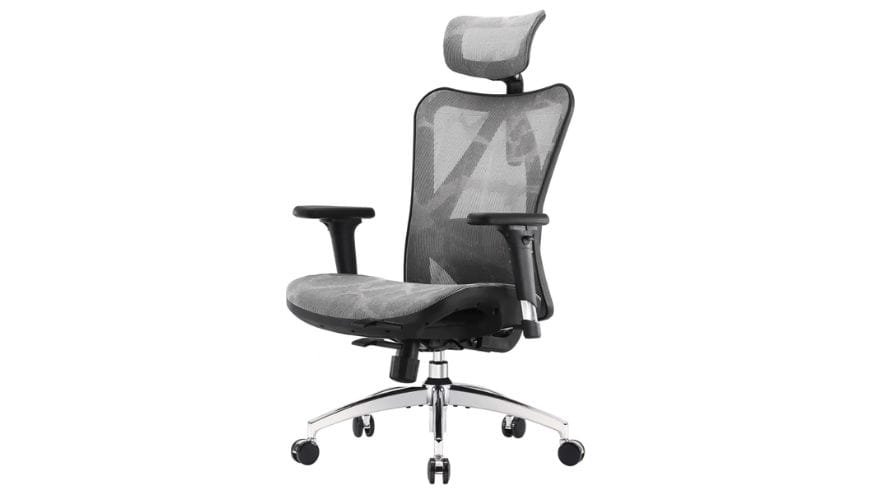
The Sihoo M57 is one of the most widely recommended entry‑level ergonomic chairs for good reason. It hits a really strong balance between price and features.
Full mesh construction means both the back and seat are breathable — excellent for people who run warm or work in non‑air‑conditioned spaces. The mesh is tensioned to be supportive without feeling too hard. Users consistently note that the M57‘s mesh is durable and does not sag over time, a common complaint with cheaper mesh chairs.
The height‑adjustable lumbar support is separate from the backrest, meaning you can position it precisely where your spine needs it — a thoughtful touch at this price point. The 3D adjustable armrests move up/down, in/out, and pivot, which is generous for an entry‑level model. The headrest is also adjustable for height and angle.
Assembly is straightforward, and the chair has a surprisingly small footprint for its feature set. The M57 uses a Class 3 gas lift, a BIFMA‑certified mechanism, and a five‑star nylon base.
Best for: Budget‑conscious beginners who want strong adjustability and full mesh breathability without stepping up to premium prices. Also a great option for warm climates or non‑air‑conditioned offices.
What makes the M57 special: The combination of features at its price point — full mesh, a separate height‑adjustable lumbar support, and 3D armrests — is uncommon in the budget category. It represents some of the best value you can get as a first‑time buyer.
3. Hbada E3 Ergonomic Office Chair — Best for Taller or Broader Users
https://hbada.com/products/hbada-e3-wpa-ergonomic-chair-white
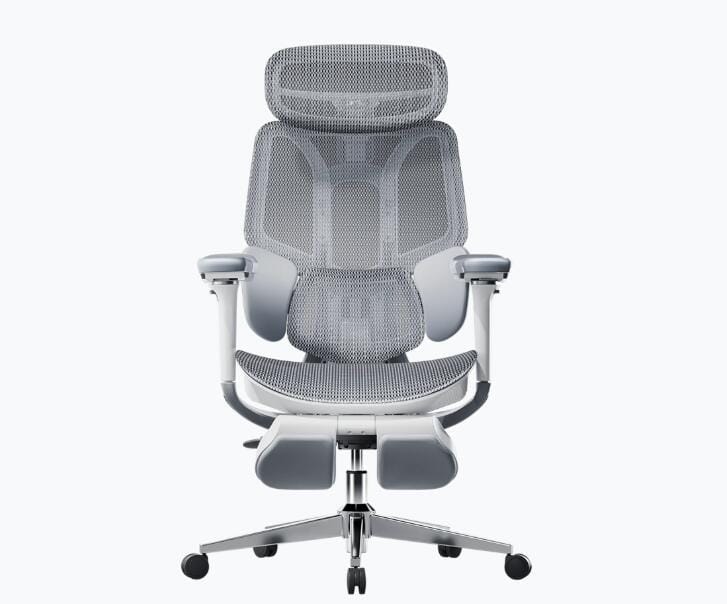
The Hbada E3 is an excellent choice for beginners who fall outside the average height or weight range. Many entry‑level chairs are designed for a medium frame — roughly 5‘5“ to 5‘10“. If you are taller or broader, the E3 is worth a look.
The chair features a three‑zone dynamic lumbar support system, which distributes pressure across your lower back more evenly than a single pad. The 3D adjustable armrests (height, swivel, forward/back) and 3D adjustable headrest provide good flexibility. The mesh back keeps you cool, and the seat is generously proportioned.
Where the E3 really shines for larger users is the seat width and base. The E3 Air variant, in particular, offers a wider seat and stronger base specifically designed for heavier users. The five‑star nylon base is reinforced, and the casters roll smoothly on various floor surfaces.
Assembly is more involved than the Sihoo M57 — allow at least 30–40 minutes — and the instructions can be a little confusing for first‑time builders. However, once assembled, users consistently report excellent comfort and reliable daily performance.
Best for: Taller or broader beginners, users with existing back pain who need targeted lumbar support, and anyone who wants a genuinely oversized seat without stepping up to premium bariatric chair pricing.
What makes the E3 different: The E3 is built for larger body types — wider seat, reinforced frame, and a weight capacity rated for heavy daily use. If you have felt cramped or unsupported in standard chairs, the E3 will feel noticeably different from the first sit.
| Feature | Meet&Co Budding | Sihoo M57 | Hbada E3 |
|---|---|---|---|
| Best for | All‑round beginner pick | Budget value | Taller or broader users |
| Back material | Breathable mesh | Full mesh | Breathable mesh |
| Seat material | Deep‑contour foam cushion | Breathable mesh | Breathable mesh |
| Lumbar support | Adjustable (height) | Height‑adjustable (separate) | 3‑zone dynamic |
| Armrest adjustability | Full (4‑way) | 3D (up/down, in/out, pivot) | 3D |
| Headrest | Yes (adjustable) | Yes (height, angle) | Yes (3D adjustable) |
| Tilt lock | 3‑position lock | Tilt lock + tension | Standard recline |
| Price range | Budget to mid | Budget | Mid to mid‑high |
Frequently Asked Questions (FAQ)
1. Do I really need an ergonomic chair if I already have a good office chair?
It depends on what “good” means to you right now. A standard office chair will let you sit, but it won‘t actively help you maintain healthy posture or reduce strain over time. If you already experience back or neck discomfort by the end of the workday, a good ergonomic chair can make a real difference — often within the first week of use.
2. What is the most important feature for a beginner to look for?
Adjustable seat height is the single most important feature. Without it, the chair cannot fit your body properly, and everything else — lumbar support, armrests, recline — becomes secondary.
3. Do I need a chair with a headrest?
Not necessarily. A headrest is helpful if you are tall (so your head extends past the backrest) or if you lean back frequently to rest or take calls. If you mostly sit upright and focused, you can skip the headrest and put that money toward better lumbar support or a more breathable seat.
4. Is mesh better than fabric for a first ergonomic chair?
For most beginners, yes. Mesh is breathable, supportive, and does not trap heat the way foam or fabric can. It is generally more durable and easier to clean. Some people miss the plushness of foam, but a chair with a mesh back and a foam seat — like the Budding — offers a helpful middle ground.
Also see: Mesh vs. Fabric vs. Leather: Which Office Chair Material Wins?
5. How much should I spend on my first ergonomic chair?
You can find a genuinely good ergonomic chair for a very reasonable price range. The Meet&Co Budding and Sihoo M57 both fall comfortably in this bracket. Spending more will get you premium materials (higher‑grade mesh, sturdier mechanisms, longer warranties) and more advanced features (synchronous tilt, 4D armrests). But for a first chair, focusing on the essentials first is smarter than over‑investing before you know what you actually need.
Looking for more ergonomic advice? Check out our full guides on ergonomic office chairs and workspace setup tips.