Meet&Co
Walk into any university lecture hall, corporate training room, or exam center, and you’ll likely find rows of tablet arm chairs. These space-saving seats, each equipped with a small attached writing surface, have become a staple in environments where every square foot counts and note-taking is essential.
But are they always the best choice? While tablet arm chairs excel in certain settings, they can be frustrating—or even counterproductive—in others. Choosing the wrong seating can lead to cramped discomfort, reduced collaboration, or wasted space.
This guide will help you determine when to invest in writing tablet chairs and when a different seating solution would serve your space better.
What Are Tablet Arm Chairs?
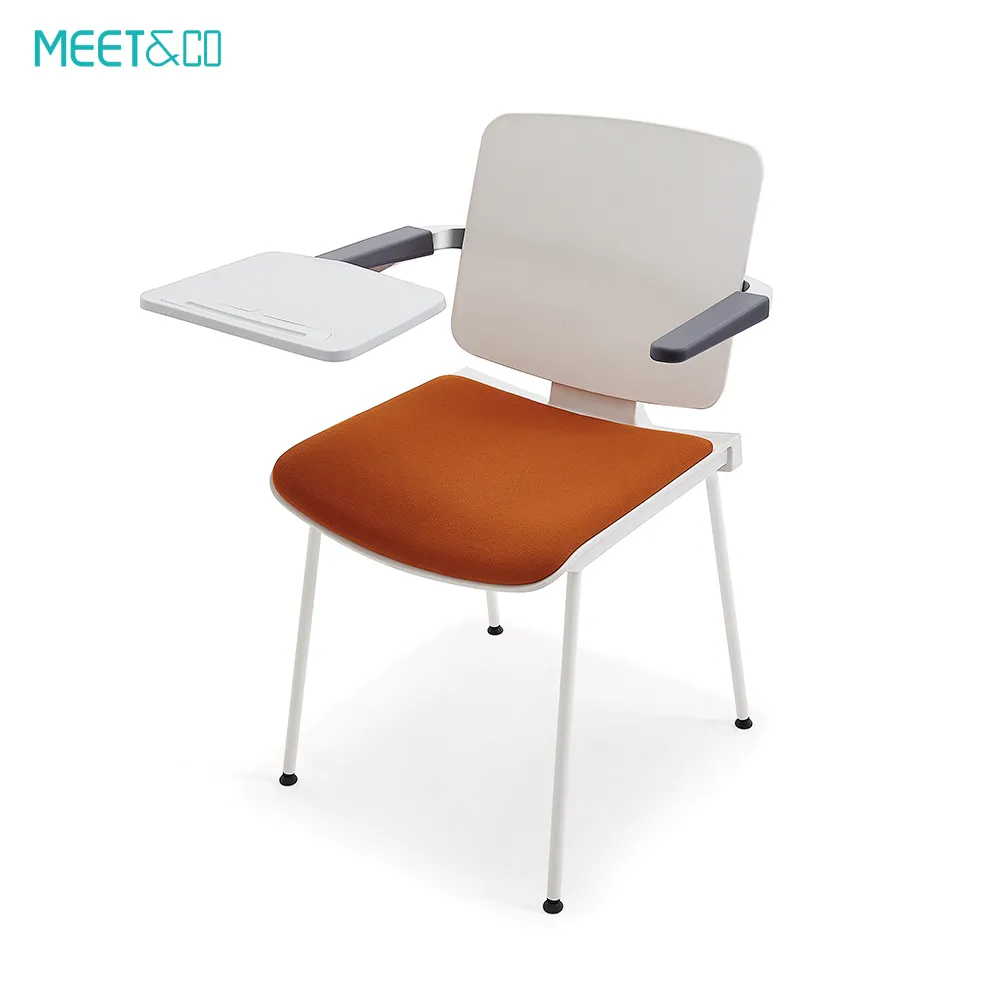
Tablet arm chairs are individual seats with a small writing surface attached to the frame—usually on the right or left side (or swiveling to either). The tablet folds up against the armrest when not in use, making the chair compact for high-density layouts.
They are commonly found in:
Lecture halls and auditoriums
Training and conference rooms
Exam and testing centers
Courtrooms
Libraries and study spaces
The core value proposition is simple: they provide a personal writing surface without requiring a separate desk or table, allowing for narrower row spacing and more seats per square foot.

When Should You Choose Tablet Arm Chairs?
1. When Space Efficiency Is a Priority
If your room needs to accommodate the maximum number of seated people while still allowing each person to take notes or use a laptop, tablet arm chairs are hard to beat. By eliminating fixed tables, row spacing can be reduced to 30–36 inches (center to back), compared to 48–60 inches required for tables and separate chairs.
Best for: Lecture halls, exam halls, auditoriums with fixed seating.
2. When the Primary Activity Is Individual, Passive Learning
Tablet arm chairs are designed for scenarios where people face forward, listen, and take occasional notes. If your audience is primarily receiving information rather than collaborating or spreading out materials, these chairs support that workflow well.
Best for: University lectures, professional seminars, religious instruction, courtrooms.
3. When You Need a Standardized, Durable Solution
Commercial-grade tablet arm chairs are built to withstand heavy use and frequent cleaning. They typically feature steel frames, high-density foam, and easy-to-clean upholstery or polypropylene shells. If your space sees hundreds of users daily, these chairs offer longevity.
Best for: High-traffic educational institutions, corporate training centers, testing facilities.
4. When You Require Flexible Writing Surface Orientation
Many modern tablet arm chairs offer ambidextrous or swiveling tablets, allowing users to choose which side they write on. This flexibility is valuable when your audience includes left-handed and right-handed individuals, or when chairs are moved between configurations.
When Should You Avoid Tablet Arm Chairs?
1. When Collaboration and Group Work Are the Focus
If your sessions involve group discussions, pair work, or extensive use of large materials (blueprints, spreadsheets, multiple books), a tiny tablet surface will quickly become a frustration. Separate tables or benching systems allow for shared workspace and easier interaction.
Consider instead: Mobile tables with standard chairs, or collaborative benching.
2. When Users Need Extended Comfort for Long Sessions
Tablet arm chairs typically have a smaller seat and less padding than executive or task chairs. For sessions lasting more than two hours, users may find them uncomfortable—especially if the tablet forces a fixed posture that doesn’t suit all body types.
Consider instead: Task chairs with adjustable arms plus separate tablet arms or desks.
3. When You Have a High Proportion of Left-Handed Users
Standard tablet arm chairs place the writing surface on the right side, leaving left-handed users to twist awkwardly. While ambidextrous models exist, they often cost more and may still not offer the same comfort as a traditional desk.
Consider instead: Standard chairs with shared tables, or chairs with a center-swing tablet that works for both hands.
4. When Accessibility Requirements Demand Flexibility
Tablet arm chairs can be challenging for users with mobility aids. The fixed tablet may obstruct transfer, and the narrow spacing between rows may not accommodate wheelchairs. While some manufacturers offer ADA-compliant tablet arm chairs (with removable or flip-up tablets), a more flexible seating layout is often better.
Consider instead: A mix of standard chairs with removable tablet arms, and clear floor space for wheelchair users.
Tablet Arm Chairs vs. Standard Chairs with Tables: A Comparison
| Factor | Tablet Arm Chairs | Standard Chairs + Tables |
|---|---|---|
| Space Efficiency | Excellent – tight row spacing possible | Lower – requires wider aisles and table depth |
| Writing Surface | Small, personal (approx. 10–12 inches wide) | Larger, shared or individual desk space |
| Collaboration | Poor – users face forward, no shared surface | Good – tables enable group work |
| Comfort (Long Sessions) | Moderate – limited adjustability | High – ergonomic task chairs plus proper desk height |
| Left-Handed Accessibility | Limited unless ambidextrous model | Excellent – user chooses seating position |
| Cleaning & Maintenance | Easy – wipeable surfaces, no separate tables | More surfaces to clean |
| Cost per Seat | Moderate to high (depending on materials) | Variable – tables add cost but chairs may be less expensive |
| Flexibility | Fixed orientation | Highly flexible – tables and chairs can be rearranged |
Key Features to Look For in Tablet Arm Chairs
If you determine that tablet arm chairs are right for your space, focus on these features to ensure functionality and comfort.
1. Tablet Size and Material
Minimum 10–12 inches wide by 14–16 inches deep to accommodate a laptop or notebook.
High-pressure laminate (HPL) surfaces are durable and easy to clean.
2. Swivel or Ambidextrous Tablet
A tablet that swings from left to right accommodates all users.
Some models offer a center-pivot design that works for either hand.
3. Ergonomic Seat and Back
Contoured backrest with lumbar support.
Seat depth and height appropriate for adult users (typically 18–19 inches high).
4. Frame Durability
Powder-coated steel frames resist chipping and rust.
Ganging mechanisms allow chairs to be connected in rows to prevent shifting.
5. Stacking or Folding Capability
If your space serves multiple purposes, consider chairs that stack or fold for storage.
Frequently Asked Questions
1. Are tablet arm chairs suitable for computer-based testing?
Yes, but ensure the tablet is large enough to accommodate a laptop or tablet device (at least 10 inches deep). Many modern tablet arm chairs are designed specifically for computer use, with tablet surfaces that support a laptop and include cable management or power outlets.
2. Can left-handed people use tablet arm chairs comfortably?
Standard right-tablet chairs are not comfortable for left-handed users. Look for models with ambidextrous tablets that rotate to either side, or choose a chair with a center-mounted tablet that swings up from under the seat. If these options are not available, consider a standard chair with a separate table to accommodate all users.
3. How much space do I need between rows for tablet arm chairs?
For tablet arm chairs, row spacing is typically 30 to 36 inches from the back of one seat to the front of the seat behind it. This allows users to enter and exit without disturbing neighbors. If you need wheelchair access, you’ll need wider aisles and removable or flip-up tablets at designated positions.
4. What’s the typical weight capacity for tablet arm chairs?
Most commercial-grade tablet arm chairs are built to support 250–350 lbs. Heavy-duty models may support up to 500 lbs. Always verify the weight rating from the manufacturer, especially for public or educational settings.
5. Can I retrofit my existing chairs with tablet arms?
In some cases, yes. Many manufacturers offer add-on tablet arms that clamp onto the frame of an existing task chair or auditorium seat. However, retrofitting may affect the chair’s stability and warranty. For new installations, it’s usually better to purchase chairs designed with integrated tablets.
Conclusion
Tablet arm chairs are a highly effective solution when space is tight and individual note-taking is the primary function. They shine in lecture halls, exam rooms, and any environment where maximizing seating capacity outweighs the need for collaboration or long-term comfort.
However, they are not a one-size-fits-all answer. For collaborative learning, extended sessions, or spaces that serve diverse user needs, a combination of standard chairs and separate tables—or flexible furniture systems—will deliver better outcomes.
Before making a decision, assess how your space is used, who uses it, and what activities take place. The right seating will support your goals; the wrong seating will become a daily frustration.
Need help selecting the ideal seating for your space? Contact our team for expert advice on tablet arm chairs and other space-saving solutions.