











 Meet&Co
Deploying the right office cubicle for call center environments reduces ambient noise by up to 40% and increases employee agent retention. By optimizing acoustics and footprint density, modern cubicles transform chaotic rooms into organized hubs. Choosing the optimal workstation layout is the fast track to hitting strict operational KPIs.
With decades of commercial design evolutions, modern systems from leading manufacturers like Herman Miller, Hon, and Meet&Co have improved how high-density environments function. Business leaders no longer have to sacrifice employee well-being for spatial efficiency.
Investing in high-performance workstations directly targets the core friction points of customer support centers: distractions, fatigue, and technical limitations. The right setup acts as a structural asset that protects your bottom line.
Key Takeaways
-
Acoustics Over Aesthetics: Prioritizing high Noise Reduction Coefficient (NRC) materials is the single most critical factor for agent accuracy and sanity.
-
Density with Comfort: Small footprints like 4×2 or 5×2 feet maximize seat capacity without compromising ergonomic movement or equipment integration.
-
Height Balances Sight: Mid-height partitions (53 inches) deliver the perfect sweet spot between visual acoustic privacy and supervisor line-of-sight.
-
Future-Proof Infrastructure: Built-in multi-circuit electrical systems and generous CAT6 cable channels prevent complex IT bottlenecks down the road.
What Is an Office Cubicle for a Call Center?
An office cubicle tailored for call centers is a specialized, compact workstation built to maximize spatial efficiency while managing high volumes of voice communications. Unlike standard corporate cubicles, these systems focus heavily on sound isolation, durable fabric tiling, and streamlined data connectivity to support back-to-back operations.
1. Call Center Cubicles vs. Traditional Office Cubicles
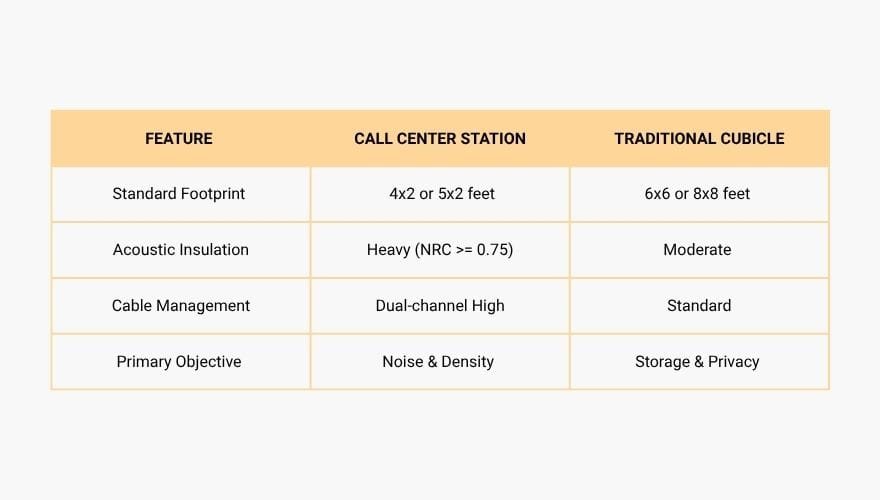
Traditional corporate cubicles typically measure 6×6 feet or larger, offering expansive desk surfaces for diverse paperwork, physical filing, and face-to-face meetings. In contrast, a modern call center workstation minimizes horizontal footprint to optimize floor space, concentrating resources on acoustic panel dampening and high-density cable routing.
2. Typical Dimensions
The most common dimensions found in modern customer service hubs are 48″x24″ (4×2) or 60″x24″ (5×2). These depths are calculated precisely to fit a standard 24-inch flat-screen monitor arm, keyboard, and headset docking station while preserving minimum clearance rules for fire escape walkways.
3. Common Workstation Configurations
Configurations generally fall into two structural paradigms: linear back-to-back rows or clustered pods. Linear designs align desks along unified power spines to cut down installation costs, while multi-desk pod shapes create localized team clusters that improve team-lead visibility and ease structural workflow.

4. Best Industries for Call Center Workstations
High-density cubicle systems are essential across several critical business domains:
-
BPO (Business Process Outsourcing): Demands extreme seat counts per square foot with heavy wear resistance for multi-shift operations.
-
Customer Support Hubs: Requires optimized acoustic dampening to shield customer ears from surrounding floor conversations.
-
Insurance Claims Processing: Benefits from high visual barriers to safeguard sensitive personal data on screens.
-
Tech Support Centers: Needs deep desktop configurations to handle multiple testing monitors and hardware peripherals.
-
Healthcare Call Centers: Requires antimicrobial fabric panels and strict sound controls to comply with medical privacy standards.
Why Call Centers Still Use Cubicles in 2026?
Despite the historical shift toward trendy open-plan offices, call centers have firmly retained and modernized the cubicle system. The physics of open spaces directly conflicts with the foundational mechanics of phone operations, making physical boundaries a structural necessity rather than an aesthetic choice.
1. Noise Reduction Benefits
When dozens of agents speak simultaneously, an open room creates an echo-chamber effect that elevates ambient noise past 75 decibels. Specialized acoustics panels bounce and absorb these frequencies, dropping background noise levels down to an optimal 45 decibels, which directly enhances automated voice recognition accuracy and call clarity. According to the comprehensive GSA Sound Matters Acoustic Report, proper physical boundaries are essential for maintaining the speech privacy needed in high-density environments.
2. Better Concentration
Visual distractions are a primary catalyst for agent fatigue. Enclosed walls remove peripheral movement from adjacent rows, allowing agents to maintain continuous focus on customer CRM interfaces, scripting sequences, and direct problem resolution tasks.
3. Faster Onboarding
Clustered cubicle configurations allow new trainees to sit immediately adjacent to senior floor mentors. This proximity enables seamless side-by-side coaching and live call auditing without disrupting the rest of the operational floor.
4. Privacy for Customer Conversations
Financial services, banking support, and healthcare verification units manage highly confidential client records hourly. High-sided fabric walls act as a vital physical firewall, preventing accidental visual data leaks and verifying compliance with rigorous operational auditing standards.
5. Open Office vs. Cubicle Productivity Comparison
A comprehensive workspace analysis featured in the University of Sydney Open Plan Office Database Research revealed that open-plan office layouts led to a 34% drop in conversational privacy and a substantial spike in cognitive fatigue compared to partitioned spaces. For a metric-driven environment, this drop translates directly to higher average handle times (AHT) and reduced customer satisfaction scores.
Best Cubicle Sizes for Call Centers

Selecting the correct workstation size involves balancing strict floor-space efficiency against agent performance limits. Reducing workstation size too far can cause claustrophobia and logistical issues with desktop hardware.
1. The 4×2 Foot Footprint: Best for Ultra-High Density
The 4×2 foot configuration is the absolute industry standard for high-density transactional environments. It provides exactly enough surface area for a single monitor, keyboard, and mouse tray, allowing facility managers to maximize seat counts in restrictive commercial footprints.
2. The 5×2 Foot Footprint: Best for Dual-Monitor Setups
The 5×2 footprint provides a crucial extra 12 inches of width. This layout is perfect for dual-monitor setups or setups requiring a physical desktop phone console alongside an integrated softphone computer screen.
3. The 5×3 Foot Footprint: Best for Technical Support Teams
Offering a deeper 36-inch work surface, the 5×3 configuration is reserved for specialized support personnel who need to handle dual monitors plus secondary printed diagnostic reference guides or external computing hardware.
4. The 6×4 Foot Footprint: Best for Team Leads & Escalations
Typically allocated for senior escalations teams, tier-three engineers, or team leaders, this spacious shape allows comfortable cross-workstation collaboration and can house under-desk personal mobile filing cabinets.
Choosing the Right Cubicle Height
The height of your workstation partitions determines the exact balance between auditory privacy and floor management visibility. Selecting the wrong height can hurt supervisor intervention speed or leave agents exposed to excessive room noise.
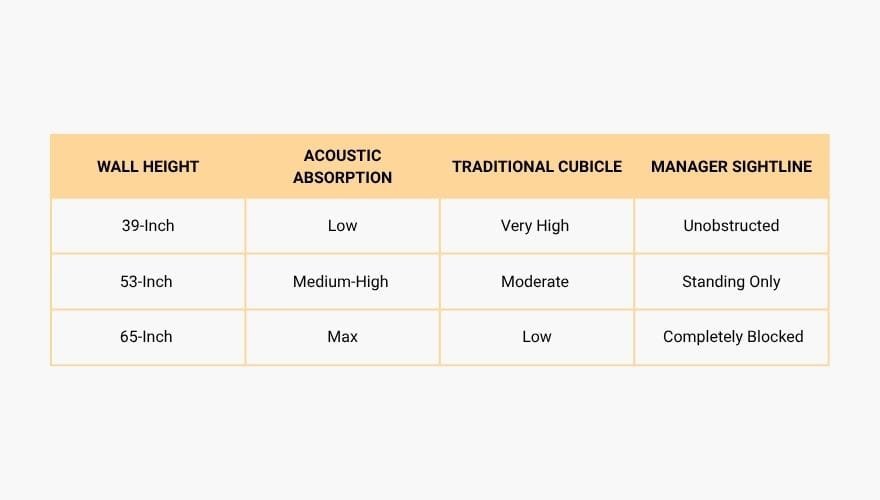
1. 39-Inch Low Wall
Low walls provide boundary definitions while maintaining an entirely open room feel. They are ideal for highly collaborative outbound sales groups where team members need constant verbal interaction and shared visual motivation.
2. 53-Inch Mid Wall
The true sweet spot for customer support operations. At 53 inches, an agent receives complete visual privacy while seated, yet floor managers can stand up and instantly scan the entire room to see who needs live assistance.
3. 65-Inch High Privacy Wall
High walls are designed for heavy noise reduction and maximum privacy. They block straight-line sound transmission between rows, making them the standard choice for financial support lines or centers dealing with sensitive healthcare data.
Top Call Center Cubicle Picks for 2026
Selecting the right commercial furniture line requires analyzing build materials, acoustic ratings, and modular call center furniture scalability. Below are the standout systems for the 2026 commercial procurement cycle, kicking off with premier designs from Meet&Co Furniture.
1. Best Overall: Meet&Co Aston30 Series A
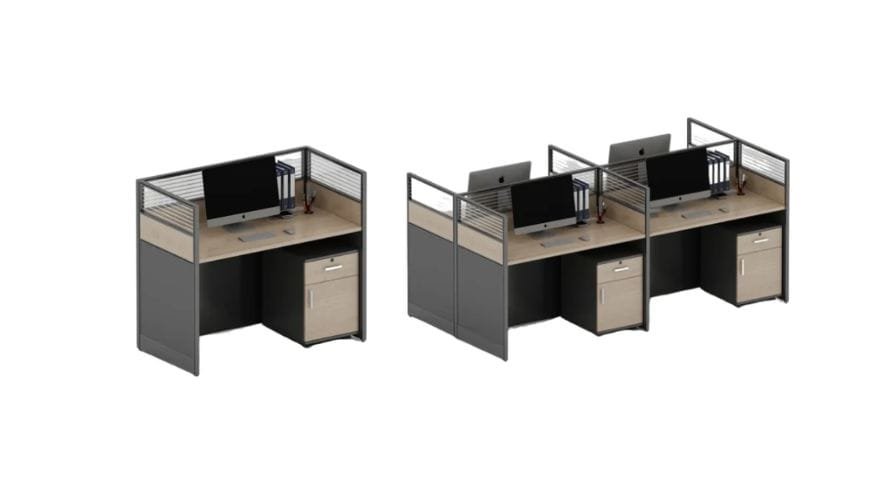
The Aston30 Series A from Meet&Co is specifically engineered for modern high-performance environments. It balances modular adaptability with clean aesthetics, offering built-in desk power tracking and robust, thick acoustic panels that keep noise low.
-
Brand: Meet&Co
-
Key Features: Integrated cable rails, multi-density acoustic core fabric, steel leg frames, snap-together components.
-
View Product: Meet&Co Aston30 Series A Office Cubicles
2. Best High-Density Option: HON Accelerate Cubicle System
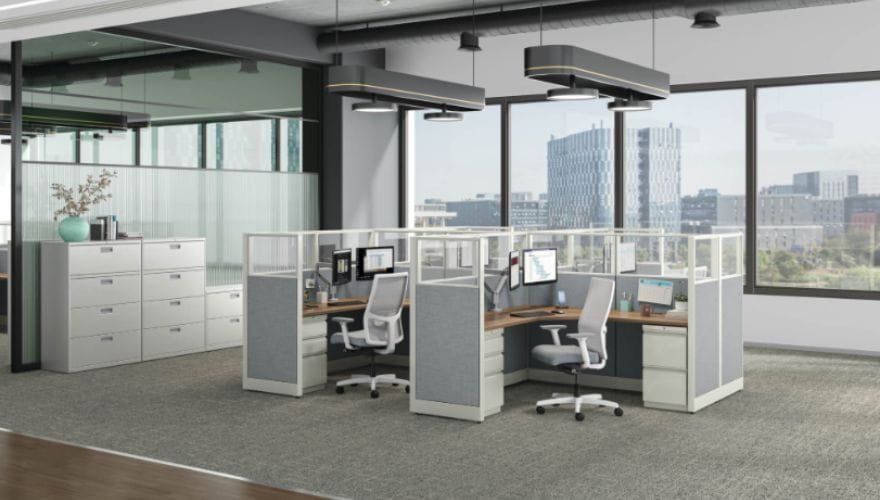
source: https://www.arensonof.com/product/hon-accelerate-cubicles/
Designed to streamline spatial layout and speed up setup times, the HON Accelerate system features a slim panel profile that maximizes floor usage without losing structural stability.
-
Brand: HON
-
Key Features: Thin panel footprints, easy tile replacements, lifetime structural warranty.
-
Product Link: HON Accelerate Cubicle System
3. Best Acoustic Cubicle: Steelcase Answer Panel System
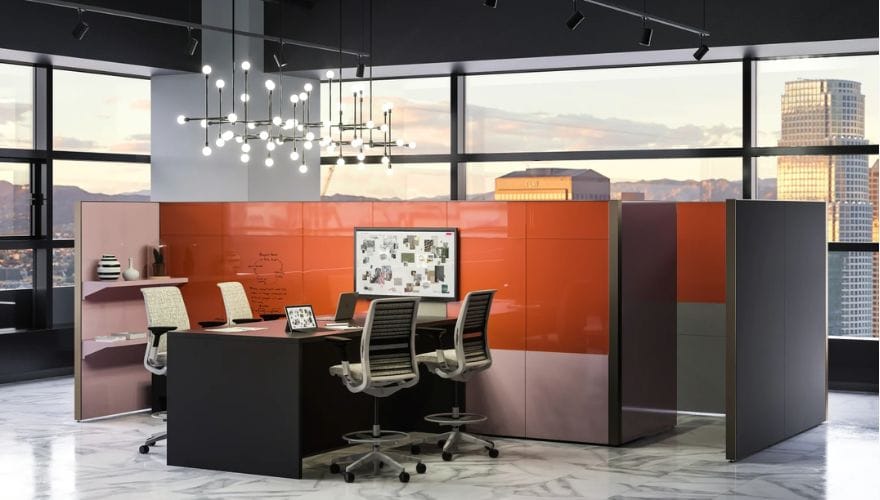
source: https://www.steelcase.com/products/workstations/answer-panel-systems/
The Answer line from Steelcase provides top-tier acoustic dampening with tight fiberglass-insulated core tiles, making it perfect for loud inbound environments.
-
Brand: Steelcase
-
Key Features: Exceptional NRC structural performance, multiple glass stacker extensions, hidden cable routing channels.
-
View Product: Steelcase Workstation Systems
4. Best for Small Offices: Steelcase Kick Workstation
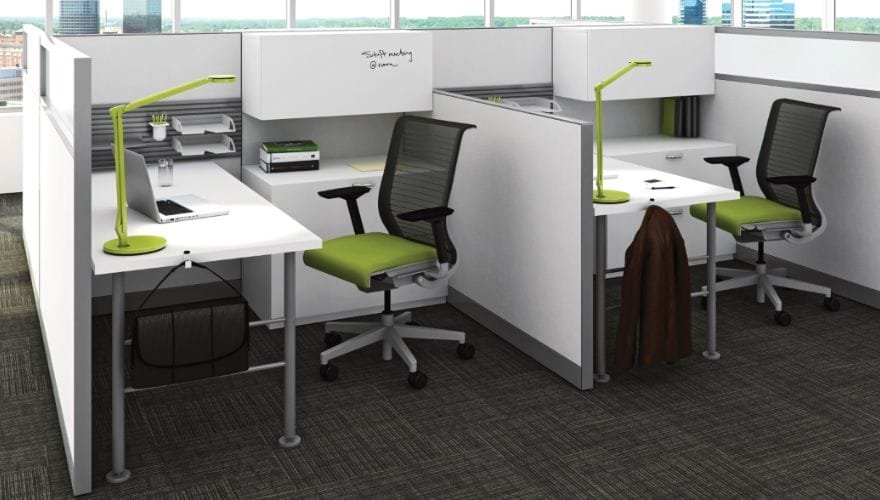
source: https://www.steelcase.com/products/workstations/kick/
Kick offers a flexible, highly effective layout options for small or unusual floor plans, blending traditional panel systems with open desking options.
-
Brand: Steelcase
-
Key Features: Slim layout profile, excellent compatibility with desktop protective glass shields.
-
View Product: Steelcase Kick Workstation System
5. Best Modular System: Friant System 2 Monolithic Panels
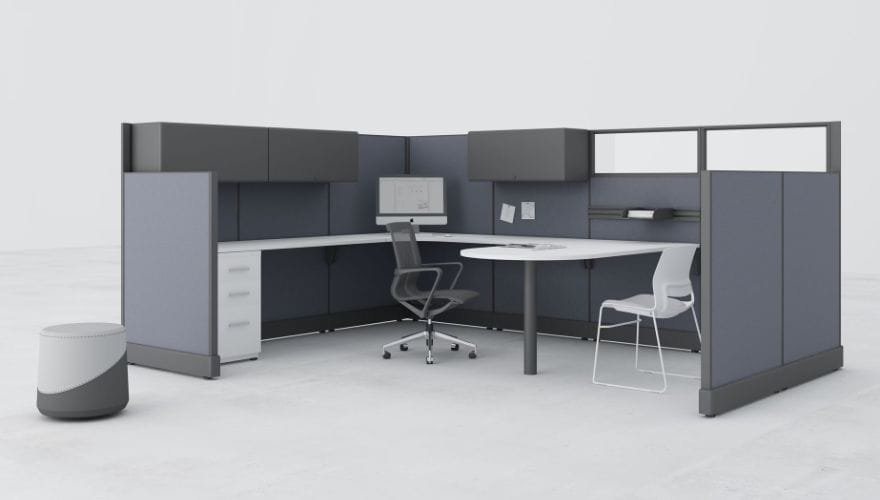
source: https://friant.com/panels/system-2/
Friant’s System 2 is built on a heavy-duty steel frame construction with a honeycombed structural core, making it highly durable for constant reconfigurations.
-
Brand: Friant
-
Key Features: Heavy-duty base frames, high-capacity cable pathways holding up to 65 Cat6 lines.
-
View Product: Friant System 2 Monolithic Panels
6. Best Hybrid Workstation: Herman Miller Action Office System
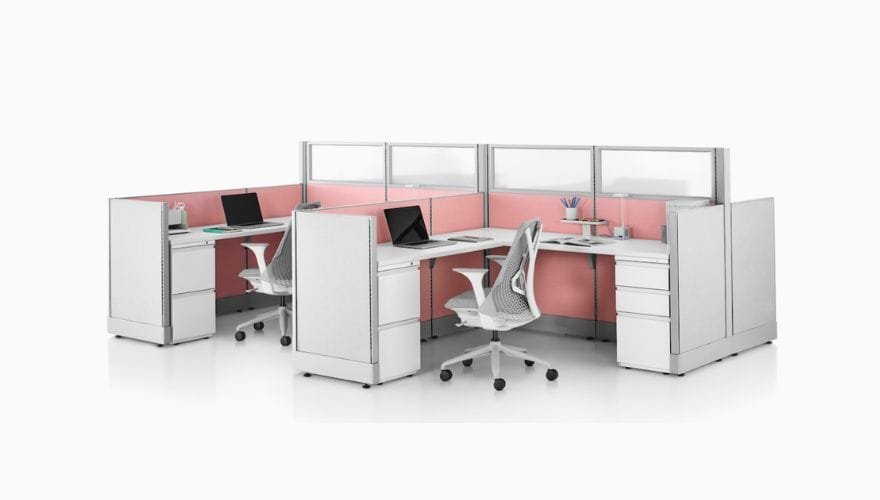
source: https://www.hermanmiller.com/products/workspaces/workstations/action-office-system/
An enduring industry classic updated for modern hybrid use cases, the Action Office line offers a simple, durable layout that stands up to multi-shift wear.
-
Brand: Herman Miller
-
Key Features: Remanufactured configurations, quick-change fabric tiles, durable laminate work surfaces.
-
View Product: Herman Miller Action Office System
Best Call Center Cubicle Layout Ideas
Your layout directly controls the daily traffic flow, acoustics, and team management dynamics on your operations floor.
1. Linear Row Layout
This configuration sets up long back-to-back rows running down the room length. It provides the highest density per square foot and relies on central power tracks, though it can create an institutional feel if not broken up by break areas.
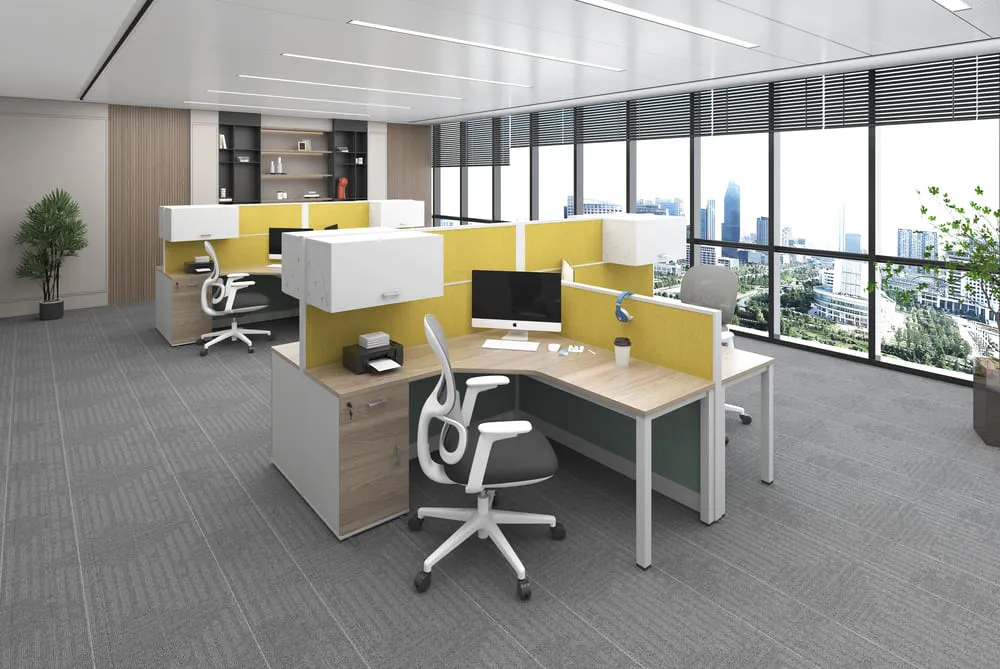
2. Pod Workstation Layout
Desks are arranged into clusters of 4, 6, or 8, facing inward or at angles. This layout boosts team identity and collaboration while giving team leads an easy, central view of their group.

Modular L-Shaped Pod Workstation Layout
3. Hybrid Office Layout
Combines deep-walled privacy cubicles for focused, high-tier phone support with low-walled desks for sales teams. This layout balances open communication with focused workspaces in the same facility.
4. Remote + Onsite Support Hub
A newer design standard featuring shared unassigned workstations for alternating hybrid team members, backed by localized secure lockers for personal headsets.
Ergonomic Tips for Call Center Cubicles
Providing solid workplace ergonomics is a proven way to reduce repetitive strain injuries and lower costly employee turnover rates. Spending long shifts stationary at a customer service workstation demands adjustable, body-supporting design choices.
1. Sit-Stand Desks
Electric height-adjustable surfaces let agents easily transition from sitting to standing during long shifts. This boosts lower-body blood circulation and helps reduce midday fatigue.
2. Monitor Arms
Articulating single or dual monitor mounts let agents set their screens at the perfect eye level, preventing neck strain and reducing daily eye fatigue.
3. Keyboard Trays
Under-desk trays with negative tilt options keep wrists in a neutral position, reducing the risk of carpal tunnel syndrome over multi-shift workloads.
4. Cable Management
Built-in steel trays and split vertical wire managers keep power cords and data lines organized beneath the desk, preventing accidental wire disconnections from leg movement.
5. Headset Storage
Dedicated storage hooks keep expensive noise-canceling headsets safe from desktop spills and accidental drops between shifts.
What are the Common Mistakes When Designing a Call Center Office?
- Critical Warning: Cutting corners on the layout phase often leads to expensive remodeling fixes within the first year of operation.
-
Choosing Cubicles That Are Too Small: Buying 3-foot desks to save space backfires if agents don’t have room for standard keyboards and dual monitors.
-
Ignoring Floor Acoustics: Selecting cheap, uninsulated plastic partitions creates an echo chamber that degrades customer call quality.
-
Poor Cable Planning: Overlooking large cable pathways leaves dangerous tangles of data cords under desks, creating fire hazards and IT issues.
-
Lack of Mechanical Airflow: Crowding rows too close together blocks floor ventilation, leaving agents uncomfortable during long shifts.
-
No Future Expansion Plan: Designing a rigid floor plan without modular expansion paths makes it difficult to scale up when new client teams onboard.
Modular vs. Custom Call Center Cubicles
Choosing modular layouts gives your operations floor the flexibility to swap components, replace single worn panels, and grow your desk count smoothly as client contracts expand.
Tier 1: Entry-Level Budget Configurations
-
Cost Range: $350 – $550 per seat.
-
What You Get: Basic 4×2 slim panels, thin fabric walls, fixed-height desks, and standard under-desk cable baskets. Quick installation speed but limited future scalability.
Tier 2: Mid-Range Performance Setups
-
Cost Range: $600 – $950 per seat.
-
What You Get: Highly durable 5×2 modular cubicles, thick acoustic fabric panels, integrated power strips, and ergonomic monitor mounts.
Tier 3: Enterprise-Grade Custom Setups
-
Cost Range: $1,000 – $1,800+ per seat.
-
What You Get: Premium sit-stand desks, custom acoustic finishes, clean hidden cable rails, and comprehensive long-term asset warranties.
Final Thoughts: How to Choose the Right Call Center Cubicle System
Building a high-performance floor layout requires balancing maximum seat counts with strong acoustic performance and long-term durability. By focusing on quality materials and smart cable routing, you build an asset that boosts team productivity and reduces agent turnover.
Ready to optimize your operations floor? Contact us today for a free space planning layout consultation, custom product quotes, and downloadable furniture resources tailored to your team’s needs.


