Meet&Co
As a leader, your workspace is more than just a place to sign documents; it is the command center of your professional life.
However, many high-level professionals find that their prestigious furniture often prioritizes aesthetics over health.
To maintain peak productivity and long-term physical well-being, one must ask: What are the ergonomic considerations for an executive desk?
In this comprehensive guide, we will explore how to harmonize the authority of a high-end office setup with the scientific principles of human kinetics, ensuring your Meet&Co Office Furniture supports both your status and your spine.
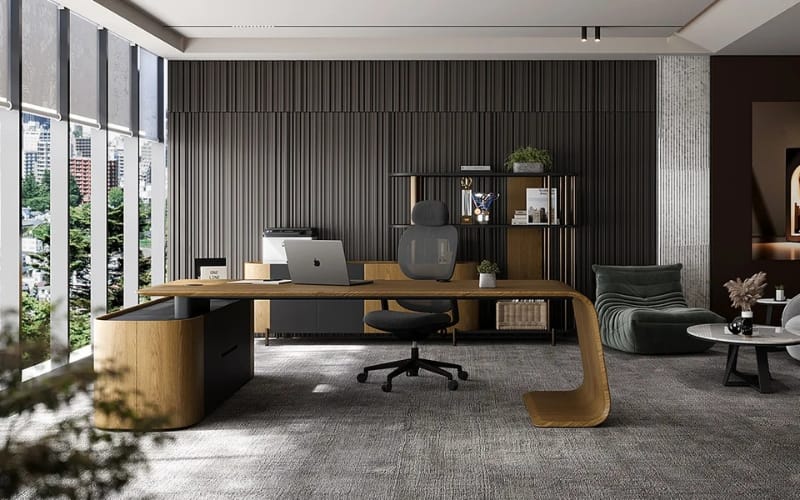
Defining the Intersection of Executive Status and Ergonomics
For five years, I have reviewed countless office desk setups, and a recurring theme among CEOs is the “luxury trap.”
A desk can be made of the finest mahogany, but if its dimensions force you into a hunched position, it is a liability, not an asset.
When we talk about executive desks, we are dealing with larger-than-average footprints and thicker materials.
Modern ergonomics defines a workspace as a “system” involving the chair, the desk, the monitor, and the user’s unique biomechanics.
For an executive, this system must also accommodate high-stress decision-making and long hours of focused work.
The Foundation: Dimensions and the “Armrest Conflict”
The most fundamental ergonomic consideration is the physical architecture of the desk.
Traditional office executive desks were built at a standard height of 29 to 30 inches.
While this suits a subset of the population, it often fails to account for the diversity of human heights.
Height Adjustability
Ideally, look for ergonomic executive desks that offer height adjustability.
When sitting, your elbows should be at a 90-degree angle, with your forearms resting parallel to the floor.
If the desk is too high, you’ll shrug your shoulders; too low, and you’ll slouch.
The “Apron” Problem
High-end desks often feature a “skirt” or apron—a decorative wooden panel under the desktop.
While beautiful, a thick apron can prevent your ergonomic chair‘s armrests from sliding under the desk.
This forces you to sit too far away, leading to “forward leaning,” which is the primary cause of lower back strain.
Ensure there is at least 10-12 inches of clearance between your thighs and the underside of the desk.
Strategic Layout: Optimizing Reach Zones
Modern executive desks are typically deep (36 to 42 inches).
This depth is great for prestige but can be an ergonomic nightmare if not managed correctly.
The Primary Zone: This is the area within easy reach when your elbows are at your sides. Your keyboard and mouse must live here.
The Secondary Zone: This area is reachable by extending your arms without leaning your torso. Items like your phone or a notepad should be placed here.
The Tertiary Zone: The far corners of high end executive desks. These should only be used for decorative items or lamps. Frequently reaching into this zone for files leads to repetitive micro-trauma in the lumbar region.
Visual Ergonomics: Sightlines and Surface Finish
Screen Positioning
With a wide desk, there is a temptation to place the monitor too far away.
The top of your screen should be at or slightly below eye level.
If you use dual monitors, they should be angled in a slight “V” shape to minimize neck rotation.
Glare and Eye Strain
Many luxury desks feature high-gloss finishes. While striking, these surfaces create significant glare from overhead lighting, leading to digital eye strain.
Opting for matte wood finishes or incorporating a leather desk pad provides a non-reflective surface that is easier on the eyes.
Leg Room and Foot Positioning
A common mistake in executive office design is sacrificing legroom for storage.
Pedestal desks must provide at least 30 inches of width for your legs.
You should be able to swivel your chair 360 degrees without your knees hitting a side cabinet.
If your desk is slightly too high and cannot be adjusted, use a footrest to stabilize your pelvis.
Cable Management: The Psychological Ergonomics
Physical health is only half the battle; mental ergonomics—the reduction of cognitive load—is equally vital.
A desk cluttered with cables creates visual “noise” that increases stress levels.
Look for desks with built-in cable grommets and under-desk trays to maintain a clean, focused environment.
Materials and Tactile Comfort
The edges of your desk matter. A sharp, 90-degree edge can cause “Pressure Point Syndrome” in your forearms, restricting blood flow to your hands.
Look for “waterfall” edges or beveled rims that allow for a soft transition for your wrists during long typing sessions.
Conclusion: The Executive Choice
In conclusion, understanding What are the ergonomic considerations for an executive desk? is about recognizing that your furniture is a performance-enhancing tool.
By prioritizing clearance, reach zones, and visual comfort, you transform your office into a sanctuary of productivity.
When selecting your next piece, remember that Meet&Co offers solutions that bridge the gap between high-level aesthetics and scientific comfort.
Investing in an ergonomic workspace is an investment in your most valuable asset: your health.