











 Meet&Co
You’ve read the reviews, compared the specs, and finally made it to the showroom. Now you’re standing in front of that ergonomic chair you’ve been eyeing. You sit down, bounce a little, think “feels nice,” and nearly swipe your card. Sound familiar?
Here’s the problem: that 20-second bounce test tells you almost nothing about how the chair will feel at 3 PM on a Tuesday. A chair that looks right isn’t the same as a chair that fits your spine. And the consequences of choosing wrong are slow enough to miss—until your lower back starts tightening by midday or your shoulders creep up because the armrests sit too low.
This 15-minute showroom checklist turns guesswork into a repeatable process. By the end, you’ll know exactly what to check, what to measure, and how to tell the difference between a chair that seems comfortable and one that actually fits your body.
Before You Start: Know Your Numbers
You’ll get more from any chair test if you walk in knowing three measurements about your own body. No special equipment needed—just a measuring tape and a flat dining chair.
| Body Measurement | How to Measure | What It Tells You |
| Popliteal height (floor to back of knee) | Sit on a hard flat chair with feet flat. Measure from floor to the crease behind your knee. | Whether the chair’s seat height range lets your feet rest flat. |
| Buttock-popliteal length (seat depth needed) | From the back of your buttock to the crease behind your knee while seated. | Whether the seat depth allows 2-3 fingers of space behind your knees. |
| Shoulder width | Across the widest point of your shoulders. | Whether the backrest is wide enough to support your upper back. |
Write these numbers down. They’re your reference points for everything that follows.
Layer 1: Static Fit Test (5 Minutes)
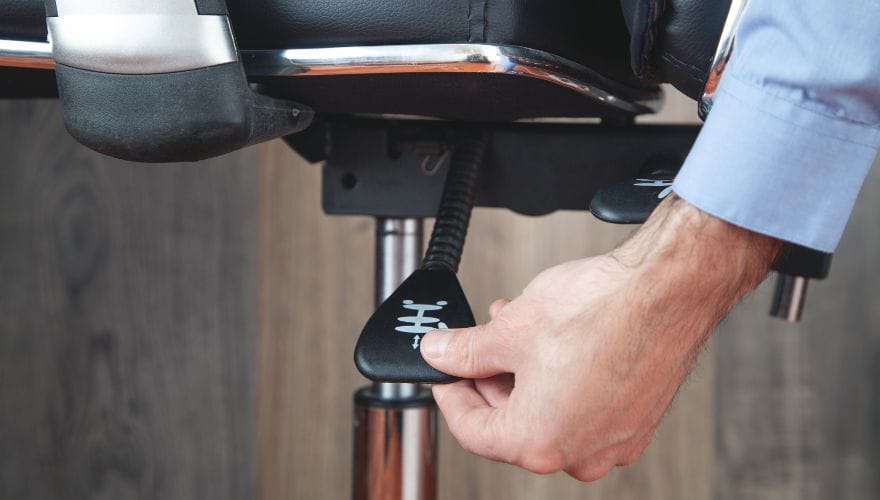
Layer 1 is pure geometry. You’re checking whether the chair’s adjustable range can accommodate your body’s physical dimensions. No subjective feelings yet—just measurements against ranges.
Seat Height Check
Sit in the chair with your feet flat on the floor. Your thighs should be roughly parallel to the ground or angled very slightly downward from hip to knee.
- If your feet dangle: The chair is too high for you
- If your knees rise above your hips: The chair is too low
Most quality ergonomic chairs offer a seat height range of roughly 42cm to 52cm from the floor, covering the majority of users. But if you’re shorter than 155cm or taller than 185cm, this is the first place fit breaks down.
Also see: What is the Standard Chair Height? A Simple Guide to Getting It Right
Seat Depth Check
Sit with your back firmly against the backrest. Look at the gap between the front edge of the seat and the back of your knees. You need 5-8cm of clearance—about two to three fingers’ width.
- If the seat edge presses into the back of your knees: It restricts blood flow. You’ll feel numbness or tingling within an hour.
- If the seat is too shallow: Your thighs aren’t properly supported, and your pelvis bears excess load.
Adjustable seat depth is one of the most underrated features. Many budget chairs fix the depth at a single position, meaning you’re either a perfect match or you’re not.
Seat Width Check
Your hips should rest comfortably within the seat pan with roughly 2-3cm of space on each side. Too narrow and you feel squeezed. Too wide and your arms can’t reach the armrests naturally, forcing your shoulders into an unnatural position.
Armrest Range Check
Adjust the armrests to their lowest and highest positions. Can you position them so your elbows rest at 90-110 degrees with shoulders relaxed? Test width adjustment too—your arms should sit directly under your shoulders, not splayed outward.
If a chair fails at Layer 1, stop here. No amount of lumbar support will fix the fact that your basic dimensions don’t match the chair’s geometry.
Layer 2: Support Fit Test (5 Minutes)

Once you’ve confirmed the chair’s dimensions match your body, test how the support systems interact with your spine. This is where the difference between a good chair and a great one becomes obvious.
Lumbar Support Position
Sit back fully into the chair. The lumbar support should press gently into the inward curve of your lower back, roughly at the level of your belt line (L3-L5 vertebrae).
- If it presses into your mid-back: It’s too high
- If you only feel the flat backrest and it misses your back entirely: It’s too low
- If you have to push backward to feel it: The support isn’t doing its job for your body
This is why adjustable lumbar height matters more than the mere presence of lumbar support.
Backrest Contact Test
While seated normally, slide your hand between your back and the backrest. Run it from your lower back up to your shoulder blades. The backrest should maintain consistent contact along your entire spine.
Pay extra attention to two zones:
- Lumbar region (lower back)
- Thoracic transition (where your mid-back curves outward)
Many chairs support the lower back but leave a gap at the mid-back, creating a pressure point that makes it harder to maintain contact over long sessions.
The Three-Minute Test
Sit in the chair for three minutes without thinking about your posture. Then check: are you still sitting upright, or have you slouched forward? If you’ve slouched, the lumbar support isn’t doing its job for your body.
Layer 3: Dynamic Fit Test (5 Minutes)

Layer 3 shifts from sitting still to sitting as you actually work. Your body moves an average of 53 times per hour while seated. The chair needs to move with you.
Tilt and Recline Test
Lean back in the chair. Does the backrest move smoothly, or does it jerk and catch? The motion should feel predictable and controlled.
Check if the tilt tension adjusts. When you lean back, you shouldn’t have to fight the chair to return upright. For synchronized tilt mechanisms, the seat and back should move together, keeping you supported through the entire range of motion.
Forward Tilt (If Available)
Some chairs offer forward tilt, which angles the seat pan down for upright, task-focused work. Test this position—it should feel natural for typing without sliding forward.
Posture Change Test
Simulate how you actually work:
- Lean forward to read something on your desk
- Sit upright to type
- Recline slightly to think or talk on the phone
- Shift to one side to grab something
The chair should accommodate these movements without fighting you. Pay attention to whether the armrests stay in position or shift when you lean.
Layer 4: Material and Construction Check (Bonus Minutes)
Foam Quality Test
Press firmly into the seat cushion with your whole hand. High-quality foam should feel soft to the touch but require more force to fully compress, and it should bounce back quickly when released.
What different foam behaviors tell you :
- Soft to touch, needs force to fully compress, bounces back quickly: High-density molded foam—gold standard
- Quite firm, takes real pressure to compress: Supportive but may lack softness; often contains filler powder to cut costs
- Very soft, bottoms out with little pressure: Low-density foam or cut scraps—won’t last
- Soft on surface but grainy/lumpy when pressed deeper: Recycled foam scraps glued together—avoid
Mesh Quality Test
If the chair has a mesh back, press into it firmly. Good mesh should provide strong support without deforming excessively. Release—it should spring back instantly with no sagging or dent.
Run your fingers across the mesh. Rough or scratchy texture indicates basic, lower-cost mesh. Soft and smooth texture suggests higher quality, possibly flocked or specially treated.
Armrest Feel
Press into the armrests. Hard plastic means basic quality. Soft PU plastic shows attention to comfort. Premium chairs often use foam-filled armrests covered with TPU material for a luxurious feel.
Edge Check
Run your fingers along all edges—metal components, plastic parts, everything. They should be smooth and free of sharp edges. Sharp or rough edges signal rushed manufacturing and potential safety hazards.
Caster Test
Roll the chair on the showroom floor. It should move smoothly without catching or sticking. Press the edge of a wheel—softer PU material means quieter rolling and better floor protection than hard nylon.
Quick Reference: 15-Minute Showroom Checklist
| Layer | What to Check | Pass/Fail |
| Layer 1: Static Fit | Feet flat, thighs parallel | ⬜ |
| 2-3 finger gap behind knees | ⬜ | |
| Hips fit with 2-3cm side space | ⬜ | |
| Armrests adjust to 90-110° elbows | ⬜ | |
| Layer 2: Support Fit | Lumbar hits belt line (L3-L5) | ⬜ |
| Backrest contacts entire spine | ⬜ | |
| No slouching after 3 minutes | ⬜ | |
| Layer 3: Dynamic Fit | Recline smooth and controlled | ⬜ |
| Chair moves with posture changes | ⬜ | |
| Layer 4: Materials | Foam bounces back quickly | ⬜ |
| Mesh supportive with no sag | ⬜ | |
| Armrests comfortably padded | ⬜ | |
| All edges smooth | ⬜ | |
| Casters roll smoothly, quiet | ⬜ |
Red Flags to Walk Away From
- Seat pan too short or long with no depth adjustment
- Lumbar support that hits mid-back and can’t adjust down
- Foam that stays compressed after pressing
- Rough mesh or sharp edges
- Wobbly base or jerky recline
- Armrests that won’t stay adjusted when pressure is applied
Conclusion
A 15-minute showroom test beats 20 seconds of bouncing every time. Work through these layers in order: start with static fit, move to support fit, test dynamic movement, and finish with material quality checks.
Remember the sequence:
- Layer 1 ensures the chair’s dimensions match your body
- Layer 2 verifies the support systems align with your spine
- Layer 3 confirms the chair moves with you, not against you
- Layer 4 validates the materials will last
If a chair fails at any layer, stop testing. A brilliant lumbar system won’t help if the seat depth is wrong. A beautiful mesh back won’t matter if the foam bottoms out in six months.
Take your time, use this checklist, and trust what your body tells you. The right chair should fade into the background during use—you shouldn’t be constantly aware of it. When you find that chair, you’ll know.
FAQs
1. How long should I test an office chair in the showroom?
Plan for at least 15 minutes. This gives you time to work through all four layers of testing without rushing. The three-minute sit test alone requires sitting still to see if you naturally slouch.
2. What if the chair feels comfortable at first, but I’m not sure?
First impressions can be misleading due to mood, expectations, or appearance. True comfort reveals itself over time. Focus on the measurable checks—seat depth, lumbar position, backrest contact—rather than just the “feels nice” impression.
3. Can I assess chair quality without sitting in it?
Not fully. Physical assessment is materially better because you can verify material quality, inspect construction execution, and directly observe how the chair behaves under real interaction. Touch reveals what eyes can’t catch.
4. What’s the most important adjustment feature?
For most people, it’s a tie between seat depth adjustment and adjustable lumbar height. Seat depth ensures proper thigh support and circulation. Lumbar height ensures the support actually hits your lower back curve, not your mid-back.
5. How do I know if a chair will last?
Check foam quality (quick bounce-back), mesh elasticity (no sagging), edge finishing (smooth everywhere), and caster material (soft PU for durability). Also look for BIFMA certification, which indicates tested commercial durability.


