Meet&Co
Your office chair isn’t just furniture—it’s your primary tool for getting work done. If you’re a remote worker spending 8+ hours daily at your desk, that chair directly affects your comfort, focus, and long-term health. A poorly designed chair doesn’t just cause temporary discomfort; it contributes to chronic lower back strain, reduced circulation, and measurable productivity loss.
Yet “ergonomic” has become a marketing buzzword, applied loosely to chairs with adjustable armrests and a mesh back—even when lumbar support is non-adjustable or seat depth is fixed. The truth is, true ergonomic design begins with anthropometric compatibility: the chair must adapt to your body, not the other way around.
This guide cuts through the noise. Based on expert recommendations, user feedback, and 2026 market data, we’ll help you find the right ergonomic chair for your home office.
Why Ergonomic Chairs Matter for Remote Workers
Remote work has eliminated the commute but introduced new health challenges. Without structured office environments, many people work from couches or makeshift desks—surfaces that don’t align with proper ergonomics.
According to the American Chiropractic Association, nearly 31 million Americans experience low back pain at any given time, with prolonged sitting being a major contributing factor. Ergonomic chairs are engineered to support the natural curvature of the spine, promote neutral posture, and reduce pressure on joints and muscles.
What to Look for in an Ergonomic Chair

Not all “ergonomic” chairs deliver equal value. Focus on these measurable, functional attributes :
| Feature | Why It Matters | What to Look For |
| Lumbar support | Maintains spine’s natural curve | Height-adjustable with depth control; static pads don’t count |
| Seat depth | Supports thighs without pressing behind knees | 2–4 inch gap between seat edge and knee crease |
| Armrests | Keeps shoulders relaxed, wrists neutral | 4D adjustable (height, width, depth, pivot) |
| Material | Affects breathability and durability | Mesh backs for airflow; high-density foam (≥3.0 lb/ft³) for seats |
| Tilt mechanism | Allows movement, reduces static load | Synchro-tilt or free-floating base with tension control |
| Weight capacity | Ensures safety and longevity | Minimum 300 lbs, BIFMA-certified |
Top 4 Ergonomic Chairs for Remote Workers
Based on expert testing, user reviews, and 2026 market data, these four chairs stand out for different needs and budgets.
1. Herman Miller Aeron
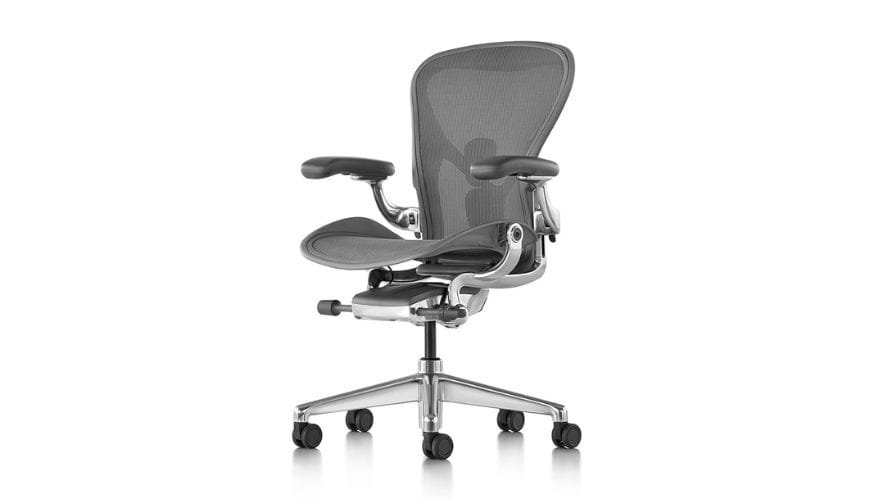
Image source: https://www.hermanmiller.com/products/seating/office-chairs/aeron-chair/
The Aeron has been a benchmark in ergonomic design since 1994 and remains one of the most recommended chairs by occupational therapists. Its PostureFit SL system supports both the sacral and lumbar regions independently, maintaining spinal alignment even after hours of sitting.
The 8Z Pellicle mesh technology distributes weight evenly while promoting airflow—ideal for warm climates or those prone to overheating. Three distinct sizes ensure proper fit for different body types.
Pros:
- Breakthrough mesh technology eliminates sweaty back syndrome
- PostureFit SL automatically maintains proper spinal alignment
- 12-year warranty reflects commercial-grade durability
- Three sizes accommodate tall/petite individuals poorly served by standard chairs
Cons:
- Investment-level pricing requires long-term perspective
- Mesh feels firm compared to plush alternatives
- Extensive adjustability creates initial learning curve
Best for: Professionals spending full days seated, those with existing back issues, users in warm climates
Also see: Best Herman Miller Chair: 4 Most Popular Picks in 2026
2. Steelcase Leap V2

Image source: steelcase.com
The Leap V2 uses LiveBack technology to mirror spinal movement as you shift positions. This dynamic response makes it ideal for hybrid postures—leaning forward for screen reading or reclining during calls. The chair adjusts tension automatically as you move.
Its 4-way armrest adjustment accommodates every possible working position, and seat depth customization fits different leg lengths properly.
Pros:
- LiveBack responds to natural spine movement, flexing appropriately
- Unparalleled 4D armrest adjustment
- Seat slider allows fine-tuning of thigh support
- Natural glide recline preserves lumbar contact throughout movement
Cons:
- Adjustment complexity requires dedicated setup time
- Substantial frame adds weight for residential moves
- Fabric options can trap heat compared to mesh
Best for: Professionals requiring extensive position variation, larger users, customization enthusiasts
3. Secretlab Titan Evo
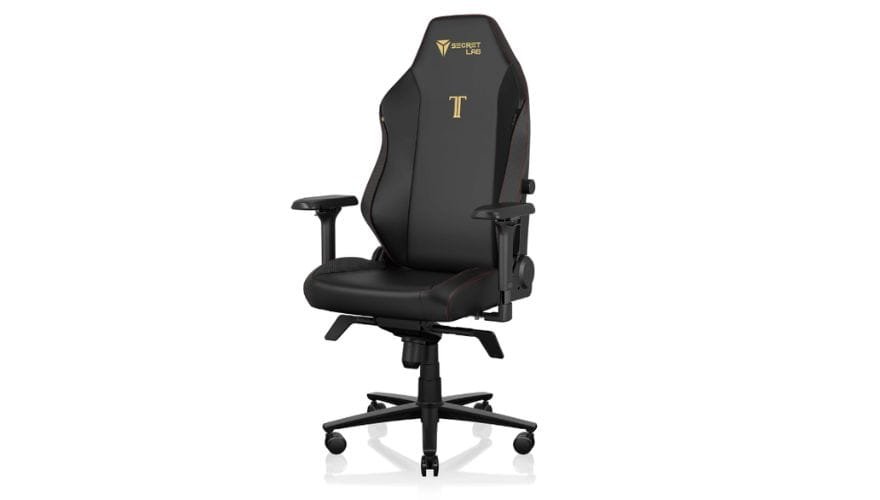
Image source: Secretlab
Originally designed for gamers, the Titan Evo has gained popularity among remote workers due to its robust build and advanced ergonomics. It offers a wider seat pan (ideal for taller or broader users) and magnetic lumbar support that can be repositioned or removed.
The intelligent L-ADAPT lumbar system automatically responds to position changes, providing appropriate support whether leaning forward for intense focus or reclining during breaks.
Pros:
- Cold-cure foam maintains supportive structure through years of heavy use
- Magnetic memory foam headrest adjusts instantly
- Reclines up to 165 degrees with infinite lock positions
- Professional-grade construction matches enterprise durability
Cons:
- Gaming heritage may not suit conservative corporate environments
- Aesthetic options limited compared to traditional office chairs
- No seat depth adjustment
Best for: Taller users, larger frames, content creators wanting sophisticated gaming aesthetics
4. Meet&Co Budding Ergonomic Chair

The Budding Ergonomic Chair takes cues from premium ergonomic chairs while offering exceptional value. The whole chair feels incredibly well put together, with a solid metal wheel base instead of nylon. The lumbar support is good, and the well-padded seat makes long-term sitting a breeze.
Pros:
- Well-padded seat with comfortable suede material
- Solid metal wheel base instead of plastic
- Various colors and add-ons
- Budget choice
Cons:
- Not as adjustable as other premium options
- Headrest slightly low for very tall users
*Best for: Anyone spending 8+ hours at a desk; stylish look works in any home office*
Quick Comparison: Top Picks at a Glance
| Chair | Lumbar Support | Warranty | Best For |
| Herman Miller Aeron | PostureFit SL (dual-zone) | 12 years | Premium build, breathability, precise adjustability |
| Steelcase Leap V2 | LiveBack (auto-adaptive) | 12 years | Dynamic sitting, frequent position changes |
| Secretlab Titan Evo | Magnetic lumbar pillow | 5 years | Taller users, larger frames, budget value |
| Budding Ergonomic Chair | Adjustable | 3 years | All-around performance, stylish design |
Step-by-Step Guide to Setting Up Your Ergonomic Chair
Even the best chair won’t help if it’s not configured properly. Follow this sequence :
- Adjust seat height: Feet flat on floor, knees level with or slightly below hips
- Set seat depth: 2–4 inch gap between back of knees and seat edge
- Position lumbar support: Align with small of back, filling inward curve
- Align armrests: Elbows at 90–110° when typing, shoulders relaxed
- Angle backrest: 100°–110° recline reduces disc pressure
- Test movement: Lean forward and back—chair should move smoothly
Re-evaluate settings every few months. Weight changes, new desk heights, or different footwear can affect fit.
Common Mistakes to Avoid
| Mistake | Why It’s Problematic | Better Approach |
| “Memory foam” without density rating | Foam below 2.5 lb/ft³ compresses permanently within months | Look for HR foam rated ≥3.0 lb/ft³ |
| Lumbar pad attached only at top edge | Provides no sacral support; forces slouching | Vertically adjustable lumbar with depth control |
| Fixed armrests | Forces shoulders into protraction during typing | 4D armrests with independent adjustment |
| Weight capacity under 250 lbs | Indicates substandard gas lift or frame welds | Minimum 300-lb BIFMA-certified capacity |
| Choosing style over function | Plush leather often lacks adjustability | Prioritize adjustability features first |
FAQ
1. How long does it take to adjust to a new ergonomic chair?
Most users adapt within 1–2 weeks. Initial discomfort may occur as your body corrects poor postural habits. Avoid reverting to old chairs during this period. If pain persists beyond 14 days, reassess fit or consult a specialist.
2. Can a good ergonomic chair eliminate back pain completely?
No single chair can cure underlying medical conditions, but a well-fitted ergonomic chair significantly reduces mechanical strain on the spine. Combined with regular movement and proper desk height, it can prevent or alleviate most posture-related discomfort.
3. Are expensive chairs worth the price?
In many cases, yes. Premium chairs use higher-grade materials, superior engineering, and longer warranties. A $1,200 chair used daily for 10 years costs about $0.33 per day—less than a cup of coffee. Cheaper models may save money upfront but often degrade within 2–3 years.
4. Do I still need a footrest if my chair is properly adjusted?
Only if your feet don’t rest flat on the floor with knees bent at 90 degrees and thighs parallel to the ground. If your chair’s minimum seat height leaves your feet dangling, a footrest isn’t optional—it’s required.
5. How long should I sit before standing?
Even the best chair isn’t meant for continuous sitting. Experts recommend changing positions every 30 minutes. Aim for at least 2–3 minutes of movement per hour to maintain circulation.
Conclusion
Choosing the right ergonomic chair is one of the smartest investments you can make as a remote worker. Your chair is more than furniture—it’s a tool for sustained productivity and long-term health.
Whether you opt for the precision engineering of the Herman Miller Aeron, the adaptive intelligence of the Steelcase Leap V2, the value-packed Secretlab Titan Evo, or the all-around excellence of the Branch Ergonomic Chair Pro, the key is personalization. Take time to adjust every lever and dial until your body feels supported, not strained.
Don’t wait for pain to act. Proactive ergonomics is the hallmark of sustainable remote work. Your spine—and your future self—will thank you.
_2-1.webp)