Meet&Co
Imagine sitting in a chair that makes you feel weightless—like you’re floating in space. That’s the promise of a zero-gravity chair. You’ve likely seen them in outdoor lounging setups or luxury home catalogs, but now, this NASA-inspired technology is making its way into offices and home workspaces. As more people look for relief from long hours of sitting, the question arises: Are zero-gravity chairs the ultimate ergonomic solution, or are they better suited for relaxation? Let’s break down the science, the benefits, and the key limitations to help you decide.
What Is a Zero-Gravity Chair?
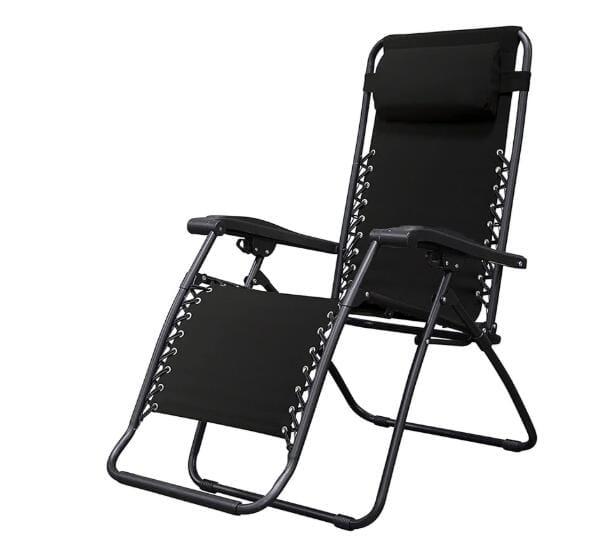
Source: https://www.amazon.com/Caravan-Sports-Infinity-Gravity-Chair/dp/B004KWBP1W?tag=thespruce-onsite-prod-20&ascsubtag=4173637&th=1
A zero-gravity chair is a seating device designed to mimic the neutral body posture adopted by astronauts during space shuttle launches. The core concept is to position the body so that your legs are elevated above your heart, and you’re reclined at a specific angle (typically 120 to 135 degrees). This arrangement evenly distributes your body weight across the chair’s surface, significantly reducing pressure on the spine and joints.
Unlike a traditional recliner that simply leans back, a zero-gravity chair achieves this precise posture through a sophisticated mechanical system. The frame usually features a curved backrest that follows the spine’s natural “S” shape, articulating segments that adjust to your body, and strategic pivot points that maintain balance during recline.
How Does It Work? The NASA-Approved Science
The “zero-gravity” term refers to the feeling of weightlessness, not actual outer space conditions. Back in the 1970s, NASA discovered that during lift-off, astronauts naturally assumed a neutral body posture where their bodies were positioned at an angle, elevating their legs above their hearts. This position was found to minimize stress on the vertebrae and intervertebral discs.
When you sit in a zero-gravity chair, the mechanics aim to replicate this posture:
-
Leg Elevation: Your legs rise above heart level, which helps improve venous circulation back to the heart.
-
Spinal Decompression: The 120-degree angle aligns your torso with your thighs, allowing the spine to naturally decompress as gravity pulls less on the vertebral discs.
-
Even Weight Distribution: By spreading your body weight evenly, the chair eliminates the “hard points” (like the tailbone and hips) that cause discomfort in traditional seating.
The Health Benefits of Zero-Gravity Positioning
When used for rest and recovery, zero-gravity chairs offer distinct health advantages:
| Health Benefit | How It Works |
|---|---|
| Reduced Spinal Pressure | Decompresses the spine by reducing gravitational compression on discs. The disc pressure in this position is around 35kg, compared to 185kg when slouching on a sofa. |
| Improved Circulation | Elevating the legs above the heart allows blood and fluids to flow more efficiently, reducing swelling and fatigue in the lower extremities. |
| Muscle Relaxation | The reclined posture reduces continuous muscle engagement, allowing the lower back and shoulders to relax and restore their natural balance. |
| Enhanced Relaxation | The feeling of weightlessness triggers a deep relaxation response, helping to alleviate stress and mental fatigue. |
These benefits make zero-gravity chairs excellent tools for taking breaks, power-napping, or aiding recovery after physical exertion.
The Ergonomics Debate: Is It Ergonomic for Office Work?
While the health benefits are clear, the central question remains: Is a zero-gravity chair actually ergonomic for office work?
Where It Excels (Passive/Recovery Ergonomics)
In the realm of “passive ergonomics”—how the body recovers during rest—zero-gravity chairs are excellent. They provide relief by unloading the spine and allowing muscles to relax. For this reason, they are often recommended for short rest periods or managing back pain at home.
Also see: Best Office Chairs for Back Pain in 2026: Tested and Reviewed
Where It Falls Short (Active/Work Ergonomics)
However, ergonomics for work involves more than just comfort; it involves enabling productivity. This is where zero-gravity chairs struggle significantly when used at a desk:
-
Limited Task Support: Typing, mousing, and aligning your monitor become difficult when your body is reclined.
-
Poor Desk Integration: Most zero-gravity chairs lack the adjustability (like seat depth, height, and armrest alignment) needed to fit a standard desk. Armrests often fail to align properly with the desk surface, forcing your arms into awkward postures.
-
Encourages Static Posture: Many of these chairs are designed for static lounging, which reduces posture variation. In an office setting, static posture leads to stiffness and reduced circulation over time.
The Verdict: A zero-gravity chair supports relaxation and recovery better than an ergonomic office chair. An ergonomic office chair is built for sustained desk work, where movement, alignment, and the ability to reach a keyboard and mouse are paramount.
2026 Trends: The Rise of Hybrid Models
The market has responded to the gap between relaxation and productivity. In 2026, a major trend is the integration of anti-gravity or “weightless” mechanics into traditional ergonomic office chairs. Models like the Sihoo Doro S300 feature an anti-gravity mechanism where the seat and backrest move in a coordinated choreography, creating a “floating” sensation while still supporting active work.
Additionally, smart chairs are emerging that use AI and sensors to automatically adjust your posture. These “smart zero gravity chairs” feature preset programs for pain relief, napping, or focus, bridging the gap between rest and work.
How to Choose the Right Zero-Gravity Chair
If you decide a zero-gravity chair is right for your home (or as a break chair in your office), here are the key specifications to look for:
| Feature | What to Look For | Why It Matters |
|---|---|---|
| Recline Angle | 120-135 degrees | This is the true “zero-gravity” sweet spot that maximizes spinal decompression. |
| Locking Mechanism | Manual locking levers or electric memory settings | Ensures the chair stays securely in position; necessary for safety and support. |
| Frame Material | High-tensile steel or aircraft-grade aluminum | Ensures durability, stability, and safety, especially for heavier users. |
| Weight Capacity | 300-500 lbs | Look for a rating 50–100 lbs above your actual weight for stability and longevity. |
| Upholstery | Breathable mesh (for office) or UV-resistant fabric (for outdoor) | Mesh prevents heat buildup during long work sessions; weather-resistant fabric is best for outdoor use. |
| Adjustability | Independent leg/back adjustment or 4D armrests | Allows you to fine-tune the fit for your specific body shape. |
Zero-Gravity Chair vs. Ergonomic Office Chair: A Side-by-Side Comparison
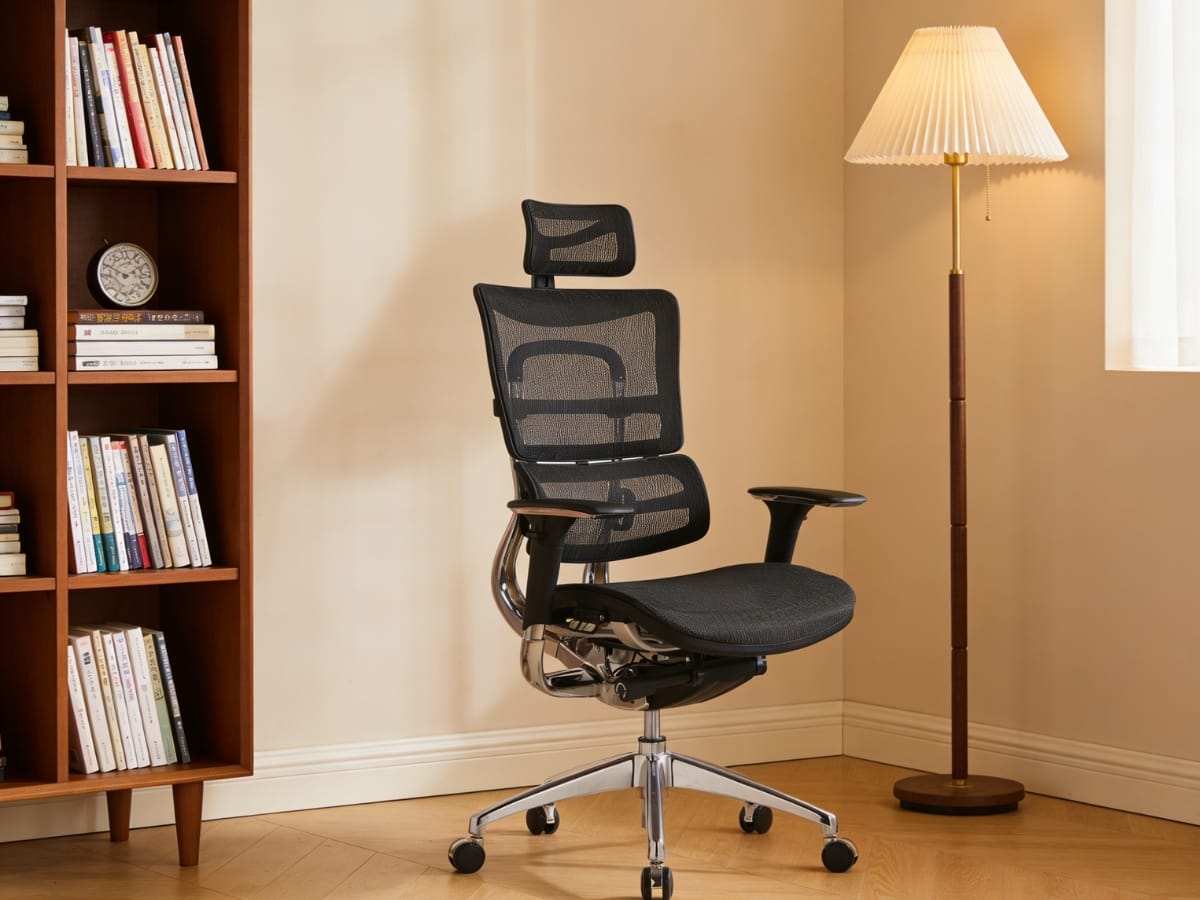
Meet&Co Full Mesh Ergonomic Chair
While both chairs aim to improve your comfort and well-being, they are designed for fundamentally different activities. One is built for active work at a desk; the other is built for passive relaxation. Choosing the wrong one for your primary task can lead to discomfort, reduced productivity, or even injury.
Below is a direct comparison to help you understand which chair belongs in which part of your day.
| Feature | Zero-Gravity Chair | Ergonomic Office Chair |
|---|---|---|
| Primary Purpose | Relaxation, napping, recovery | Desk work, typing, computer use |
| Core Posture | Reclined (120–135°), legs elevated | Upright to slight recline (90–110°), feet flat |
| Spinal Support | Decompresses spine by reducing gravity’s pull | Maintains natural lumbar curve during active sitting |
| Desk Compatibility | Poor – too reclined for typing or screen viewing | Excellent – designed for standard desk heights |
| Adjustability | Limited (recline angle, footrest) | Extensive (seat height, depth, lumbar, armrests, tilt) |
| Armrests | Often fixed or absent; not designed for typing | Fully adjustable (4D) to support forearms at desk level |
| Typical Use Duration | 15–60 minutes (breaks, naps) | 4–10+ hours (full workday) |
| Best For | Taking breaks, meditating, back pain relief, napping | Daily office work, gaming, studying, long-term sitting |
| Price Range | $150 – $1,500+ (luxury massage models) | $300 – $2,000+ (premium ergonomic chairs) |
FAQ: Zero-Gravity Chairs and Ergonomics
1. Can I use a zero-gravity chair as my daily office chair?
No. Zero-gravity chairs are designed for relaxation, not active desk work. They lack the adjustability (seat height, depth, armrest positioning) needed to align your body with a standard desk, monitor, and keyboard. Using one for daily work will likely lead to neck strain, awkward arm postures, and reduced productivity. Use an ergonomic office chair for work; keep the zero-gravity chair for breaks.
2. Is sitting in a zero-gravity position good for my back?
Yes, for short periods. The 120–135° recline with legs elevated reduces pressure on spinal discs and can provide relief from lower back pain. However, prolonged static sitting in any position—even a good one—can cause stiffness. Limit zero-gravity sessions to 15–30 minutes as part of a break routine.
3. What’s the difference between a zero-gravity chair and a standard recliner?
A standard recliner simply tilts your torso back while keeping your legs relatively low. A true zero-gravity chair raises your legs above your heart level and achieves a specific angle (120–135°) that evenly distributes weight and decompresses the spine. The feeling is noticeably more “weightless” than a typical recliner.
5. Can I sleep in a zero-gravity chair overnight?
It’s not recommended. While the position is comfortable for napping, sleeping all night in a zero-gravity chair can strain certain joints (hips, knees) and may not provide the full spinal support of a flat mattress. Use it for short rests, not as a bed replacement.
Conclusion
So, is a zero-gravity chair ergonomic? It depends on the job.
For active work—typing, coding, or participating in video calls—a traditional ergonomic chair with adjustable lumbar support is the better tool. It keeps your spine aligned while you engage with your desk.
For rest, recovery, and break times, zero-gravity chairs are exceptional. They provide a physiological reset, improving circulation, relieving spinal pressure, and melting away muscle tension.
For most people, the optimal home or office setup isn’t an either/or choice, but a hybrid one. Use a high-quality ergonomic chair for your daily tasks and a zero-gravity chair for your breaks, reading, or meditation. By understanding the distinct roles of each, you can create a workspace that supports both your productivity and your long-term health.

_10-1.webp)